Enterprise Linux — Stacked VM and Application HA with Pacemaker
Background
In the early 2000s, Linux was just starting to show up commercially. Mid-market companies were building software and appliance products, selling them into businesses, and then scrambling to stand up technical support teams—roles for which people who actually knew Linux were hard to find.
I remember showing up to what would become my first employer and, in the lobby, taking a twenty-question Linux screening quiz. One question asked me to identify Dennis Ritchie. I scored a 90%, missing only two questions — both on the OSI model. The hiring manager came downstairs on the spot. That’s how scarce the skill was. Most candidates were coming in with “I’ve dual-booted Linux at home a bit.”
If anything, the problem today is almost the opposite.
Modern engineers are incredibly productive building on high-level abstractions — Kubernetes, for example. But when those abstractions fail them, the fact that they learned Linux top-down rather than bottom-up shows.
There’s a scene in Jurassic Park where a kid sits down at an unfamiliar system and figures it out. “It’s a UNIX system,” she says. “I know this.” People laugh at that line, but it’s basically right. Often, deep UNIX experience alone is enough. It gives you five or ten different angles of attack — even when you’ve been parachuted into something you’ve never seen before.
A lot of my recent roles have been defined by those moments — stepping in as the escalation point when systems stop behaving at the abstraction layer and have to be understood from the bottom up.
Introduction
The previous post in this series built a complete application-layer HA cluster using Pacemaker—an A/B pair of PostgreSQL guest VMs, multipath iSCSI shared storage, and a floating VIP—all running as guests on Proxmox.
Quietly, it had a fundamental flaw: the TrueNAS iSCSI appliance was itself a VM, running on one of those same Proxmox nodes. That’s a contradiction.
As a lab for exploring HA concepts—a starting point for building Pacemaker competency, something meant to be iterated on—it worked.
This project is significantly more ambitious—not simply because it corrects those lab shortcuts, but because it moves the problem down a layer. The previous system demonstrated high availability within a virtualized environment; this one makes the virtualization layer itself highly available, while preserving the application cluster on top.
The goal is a system where both layers participate: the PostgreSQL cluster remains protected by Pacemaker at the application layer, while the hypervisor platform beneath it is itself made highly available by the same engine.
A Key Insight — Pacemaker as Strategic Primitive
Most serious applications have dedicated HA ecosystems built around them — Patroni for PostgreSQL, Group Replication for MySQL. These are best-in-class solutions, purpose-built and deeply integrated. They’re also only useful for the one thing they were designed for.
Pacemaker is deliberately different. It isn’t a PostgreSQL HA tool or a VM HA tool — it’s a general-purpose distributed state machine you program with a problem. You define what “available” means, model the resources and constraints, and it enforces them. The generality isn’t a weakness; it’s the point. Because it carries no assumptions about what it’s managing, it can be handed arbitrary problems.
That’s what shifts the framing here. The previous lab used Pacemaker for an application stack. Nothing about that model was specific to PostgreSQL. The same engine, handed a different problem — the virtualization layer itself — should behave the same way. This project tests that premise.
In production, you’d use a platform that already delivers VM HA. This project deliberately doesn’t. It’s a skills-sharpening exercise — one where working with Pacemaker directly is the point, not a means to an end. The mature platforms are good enough that you almost never end up under the hood, and that’s precisely the problem: low-level instincts don’t stay sharp and low-level skills don’t stay current without problems where higher-level tools would otherwise do the work for you.
That said, the previous project’s thesis still holds: VM HA does not replace application-layer HA.
The application-layer Pacemaker cluster carries forward, continuing to protect its PostgreSQL workload—modified to replace dependence on external shared storage with DRBD replication orchestrated directly between its two guests.
The result is a two-layer system in which both the application and the infrastructure beneath it are independently and explicitly modeled for availability.
Architecture Overview
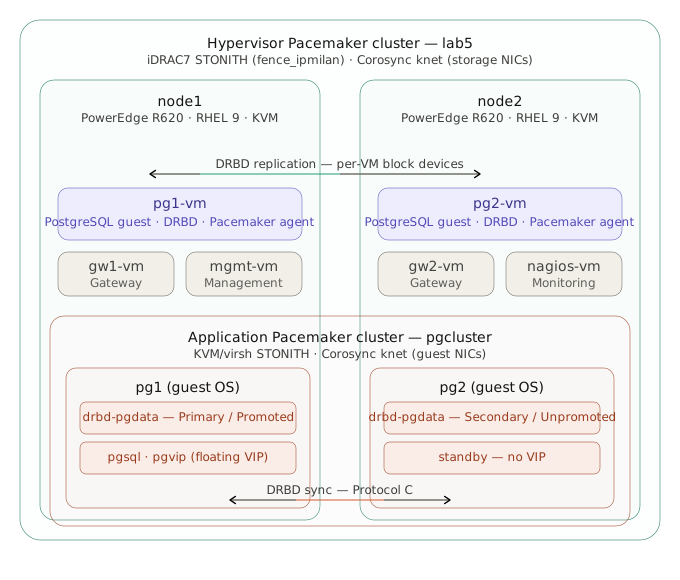
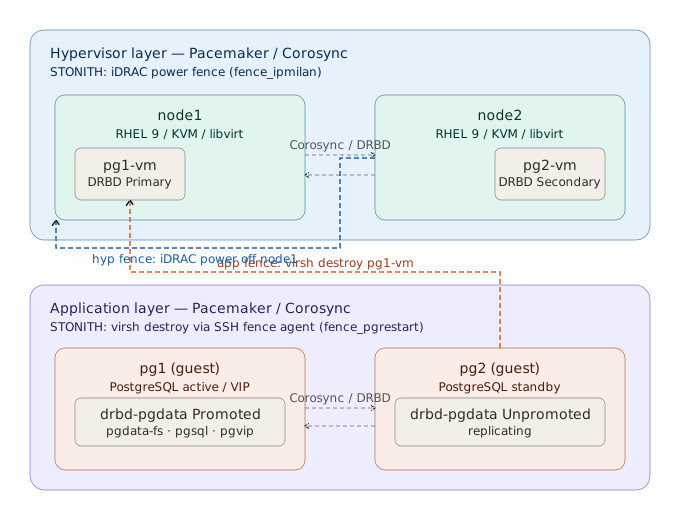
The system runs two independent Pacemaker clusters — one at the hypervisor layer managing VM placement and storage, one inside the PostgreSQL guests managing the database and floating VIP. Each responds to failure on its own terms.
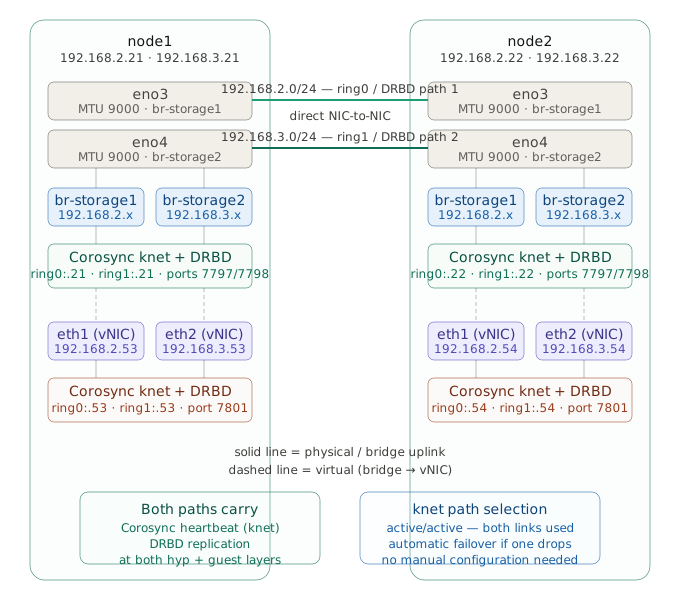
Each node has two NICs dedicated exclusively to storage traffic, separate from management and VM networks. These are cabled directly peer-to-peer, forming two independent L2 storage networks (192.168.2.0/24 and 192.168.3.0/24).
Both networks are bridged into the guest VMs via additional vNICs, so the guests inherit the same dual-path storage topology as the hypervisors.
As a result, both layers are wired identically: Corosync (knet) and DRBD run over both links in active-active mode at the hypervisor and guest levels.
Storage Design
VM high availability has a well-known prerequisite: both hosts must be able to see the VM’s disk. Without it, there’s nowhere for the VM to go when its host fails.
The options are roughly three:
- SAN (iSCSI/FC) — shared storage, live migration possible, external dependency, potential SPOF
- HCI (Ceph/vSAN/Gluster) — distributed shared storage, live migration possible, 3+ nodes recommended, significant overhead
- DRBD — synchronous block replication, no shared storage, single-primary model, two nodes sufficient, kernel-level
My constraints are simple: two nodes, no external SAN, self-contained. That rules out option one on hardware grounds. Options two and three both warrant a closer look.
Fundamental difference: failure semantics.
DRBD mirrors whole block devices. At any point in time you have two complete, independently usable copies of your data. If the replication layer disappears, the data doesn’t — you can mount either side and proceed. Failure degrades you to one copy, not zero access.
Ceph distributes data across the cluster. The data only exists as a function of the cluster being able to assemble it. If you lose enough of the system (quorum, OSDs, or consistency), you have no operational access to your data until the cluster is healthy again. Recovering means understanding Ceph well enough to coax it back.
My decision: DRBD. DRBD gives me something I can hold in my hand — a block device, right there on local storage, with a peer copy I can reason about. If something goes wrong I know exactly where the data is. Live migration is an acceptable tradeoff.
DRBD is part of the mainline Linux kernel and used in production at scale. LINBIT — founded by the original authors, Philipp Reisner and Lars Ellenberg — provides commercial support and enterprise features on top of the open-source core. On RHEL, DRBD is not part of the supported Red Hat stack; running it in an enterprise shop introduces a dual-vendor support model, which is a real consideration.
Storage Implementation
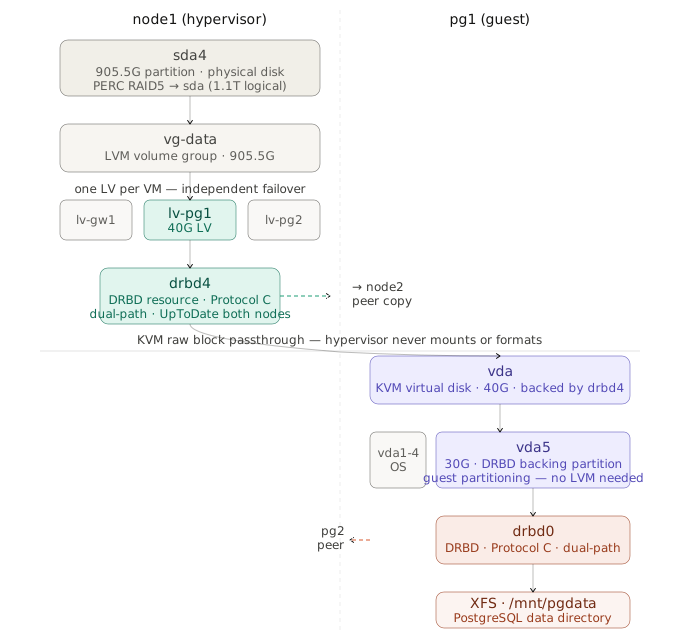
Just as Pacemaker runs independently at both layers, so does DRBD. At the hypervisor layer, each VM’s disk is a DRBD resource — an LV on each node, replicated synchronously, with Pacemaker controlling which node holds the Primary role. At the application layer, inside the PostgreSQL guests, DRBD runs again — this time replicating the database volume between the two guest OSes over the same dual-path storage networks.
Pacemaker — Putting It Together
With nontrivial infrastructure on Linux — virtualization, storage, backup systems, networking — what’s going on under the hood is towers of virtual device abstractions being assembled and torn down by the product.
Even painstakingly dissecting a single instance of this — say, in support — is hard. There’s a wiki article: 10 or 15 steps — losetup into cryptsetup into mount, each command taking as its parameters the output of the last.
The complexity and moving parts compound fast. Anyone who’s been around this stuff knows how fragile it gets — and a highly available virtualization platform is one of the harder problems in infrastructure.
I thought of something I wrote in the last project’s Key Design Decisions and Rationale:
Favor general, composable mechanisms (even if partly manual) that emphasize survivability and operability under pressure. They don’t need to predict every failure — only supply the building blocks and flexibility to adapt when reality inevitably deviates.
In the previous lab, Pacemaker impressed me immediately. I watched it work and waited for it to fumble. It never did. It has the language to encapsulate that intricate, layer-by-layer complexity into composable, reusable primitives — and it executes them the same way every time. Not once did it deliver something broken. I knew then it could be handed this problem and would solve it correctly and reliably.
Here’s how the system comes together under the Pacemaker paradigm.
Hypervisor-Layer HA Cluster
DRBD provides synchronized block devices. libvirt provides VM lifecycle operations. Pacemaker turns these independent components into a system that keeps VMs running and moves them between hosts when necessary. It does four things with each VM:
-
Health checks and in-place restart. Pacemaker monitors each VM process on a regular interval. If a VM dies — killed, crashed, whatever — Pacemaker restarts it on the same node. No migration, no fencing, no storage handoff. This is the VM equivalent of the PostgreSQL process kill scenario from the previous project: the node is healthy, the service just needs to be brought back up.
-
Takeover on host failure. If an entire hypervisor node fails or partitions, the surviving node fences it via iDRAC, confirms it’s physically dead, promotes the DRBD device, and starts the VM. This crosses the hardware boundary — detection and recovery both happen from the other physical host, which is the only place they can happen when a node goes down.
-
Ordered handoff for planned maintenance. Putting a node into standby triggers a clean shutdown of its VMs, orderly DRBD demotion, promotion on the peer, and VM restart there. The handoff is coordinated — the departing node releases resources before the receiving node claims them.
-
Split-brain prevention. Before Pacemaker will promote a DRBD resource or start a VM on the surviving node, it requires positive confirmation that the other node is dead. The iDRAC fencing configuration and delay-based tiebreaker ensure that in any partition scenario, exactly one node survives to run resources. Without this guarantee, the rest of the design is unsafe.
The VM as a Dependency Chain
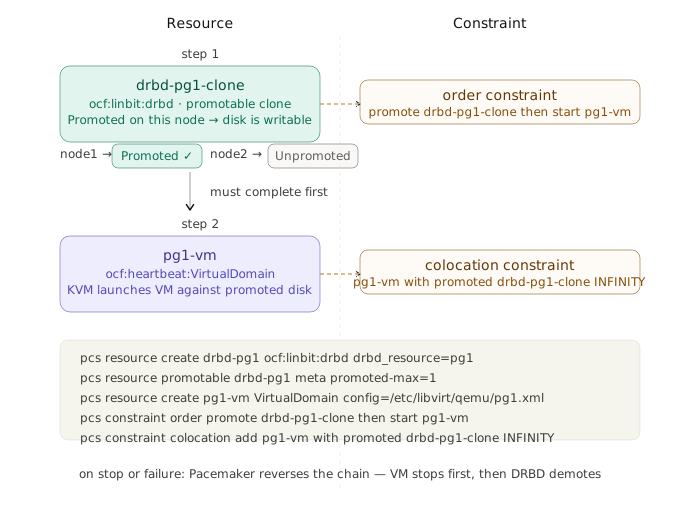
Pacemaker doesn’t have a native concept of “VM.” It has resources, constraints, and groups. A VM in this build is expressed as a chain with two links:
-
Promote the DRBD resource to Primary on this node. The backing block device becomes writable — the VM’s disk is now available exclusively on this host.
-
Start the VirtualDomain resource. KVM launches the VM process, which opens the now-writable DRBD device as its virtio disk.
Pacemaker enforces this chain in order on start, and tears it down in reverse on stop or failure. Using pg1 as a representative example, the constraints are:
pcs constraint order promote drbd-pg1-clone then start pg1-vm
pcs constraint colocation add pg1-vm with promoted drbd-pg1-clone INFINITY
The colocation constraint means pg1-vm will only ever run on the node where drbd-pg1 is Primary — the disk is always local to the VM. The ordering constraint means the promotion must complete before the VM starts — the VM never attempts to open a disk that isn’t ready. Together they guarantee exclusivity and correct startup sequencing.
Per-VM Independence
Each VM in the cluster has its own DRBD resource, its own VirtualDomain resource, and its own constraint set. Pacemaker can fail over pg1-vm without touching pg2-vm, and vice versa. The LVM-per-VM design at the storage layer is what enables this: each VM’s disk is an independent DRBD resource.
A location preference gives each VM a home node during normal operation:
pcs constraint location pg1-vm prefers node1=100
pcs constraint location pg2-vm prefers node2=100
STONITH and Self-Healing
This design uses iDRAC power fencing (fence_ipmilan) for STONITH. It provides a hard, out-of-band guarantee of node isolation at the cost of destroying crash state. Modern VM HA platforms often favor non-destructive isolation so the failed node can be inspected — Proxmox VE pairs Corosync with a hardware watchdog and lets a partitioned node self-fence by reset when it loses quorum; oVirt uses sanlock leases on shared storage so a node that can’t renew its lease voluntarily releases resources. Both avoid reaching across the network to power-cycle a peer.
The upside of the older Pacemaker model is that fencing doubles as self-healing. A fenced node is power-cycled, and—hardware permitting—will reboot, rejoin Corosync, and resynchronize via DRBD without operator intervention. Pacemaker then reconciles resource placement against the restored node.
Auto-failback of failed-over VMs to their preferred node after recovery is optional, and I initially intended to disable it — automatic rebalancing can cause a second disruption that production systems don’t need. I set resource-stickiness=1 with that intent, but the value was wrong: defeating auto-failback requires a stickiness greater than the location preference (100), so 101 would have been correct. Testing surfaced the mistake when VMs failed back unexpectedly.
Rather than fix the value, I left auto-failback enabled — but only after convincing myself the behavior was defensible in this specific topology. In unplanned failure scenarios, the app-layer cluster detects the VM loss, fences it, and moves the VIP to the surviving guest before the failed VM is even migrated, let alone before the failed hypervisor recovers. By the time auto-failback eventually moves the VM home, it’s a standby guest, not an active one — the second disruption I was trying to avoid doesn’t materialize.
Visibility — Event-Driven Monitoring
A cluster that self-heals this effectively creates a visibility problem. Most recovery actions — in-place VM restart, graceful migration, host failover — complete well inside a typical ~60-second polling interval. Even when STONITH triggers a full node reboot, the critical transitions — node lost, fence fired, resources migrated — happen in the opening seconds. In practice, the cluster moves faster than polling can observe.
The solution is Pacemaker’s native alert agent mechanism. Instead of polling for state, the cluster pushes events: membership changes, resource transitions, fencing actions — each triggers a script that submits a passive check result to Nagios in real time. Events arrive regardless of polling interval.
Application-Layer HA Cluster
The hypervisor layer keeps VMs running. It does not know or care what runs inside them. For that, a second Pacemaker cluster operates independently within the PostgreSQL guest VMs, protecting the database, its backing storage, and the floating VIP clients connect to.
What Changed from the Previous Design
The previous project in this series built an equivalent application-layer cluster on iSCSI shared storage—a single TrueNAS target providing a block device both cluster nodes could access, with LVM system_id providing exclusive activation protection. That design worked. This design replaces shared storage with DRBD synchronous replication between the two guests. Each PostgreSQL VM has its own local block device—a dedicated partition on the virtual disk the hypervisor layer already protects. DRBD mirrors writes between them with Protocol C, the same synchronous mode used at the hypervisor layer. One node is Primary (read/write, PostgreSQL running), the other Secondary (replicated, not mounted). Pacemaker’s promotable clone manages the transition.
The result: no external storage dependency. The failover sequence reduces to fence → promote DRBD → mount filesystem → start PostgreSQL → move VIP. Everything is local.
Storage Design
Each guest VM was provisioned with a 40GB virtual disk. The RHEL 9 cloud image consumes roughly 10GB for the OS, leaving approximately 30GB unallocated. A fifth partition (vda5) carved from that space serves as the DRBD backing device for the PostgreSQL data directory.
DRBD replicates the partition between pg1 and pg2 over the same dual-path storage networks used by the hypervisor layer (192.168.2.0/24 and 192.168.3.0/24 via secondary/tertiary vNICs). The topology is identical at both layers: two independent physical paths, no switching, with DRBD multipathing across both links. Corosync uses these same interfaces, so heartbeat and replication share the same redundant fabric.
Pacemaker’s ocf:linbit:drbd resource agent manages the promotable clone. The filesystem, PostgreSQL, and VIP resources are colocated with the Promoted instance and ordered after it. On failover, DRBD demotes on the departing node, promotes on the receiving node, and only then does the filesystem mount and PostgreSQL start. The disk is never writable in two places.
Fencing the Guest Layer
The guest cluster requires STONITH with the same hard-fence semantics as the hypervisor layer. The mechanism is different.
For guest VMs, fencing is done by issuing a virsh destroy against the VM from the hypervisor layer, targeting whichever physical host the VM currently occupies.
The challenge is that the guest cluster cannot know in advance which hypervisor a given VM occupies. VMs have a preferred node but can migrate. The solution is a two-phase locate-then-destroy fence agent: query each hypervisor to find where the target VM is running, then issue a hard virsh destroy against the correct host.
The implementation uses SSH with a dedicated unprivileged account, restricted via forced-command in sshd_config to exactly two operations against a fixed VM allowlist: query and destroy. Details follow later in this document.
The fence is declared successful either when virsh destroy completes and returns zero, or when both hypervisors affirmatively report the target VM absent—already dead, which satisfies the fencing objective. Once the VM is destroyed, the hypervisor-layer Pacemaker detects the unexpected disappearance on its next VirtualDomain monitor probe and restarts the VM automatically.
Resource Stack
The application-layer resource stack follows the same dependency-chain pattern as the hypervisor layer, with resources appropriate to the workload:
DRBD promotable clone (drbd-pgdata)
  └── Filesystem (pgdata-fs, XFS on /dev/drbd0)
       └── PostgreSQL (pgsql, ocf:heartbeat:pgsql)
            └── Floating VIP (pgvip, 10.0.5.200)
Ordering constraints enforce the bottom-up startup and top-down teardown. Colocation constraints ensure every resource runs on whichever node holds the Promoted DRBD instance. The VIP is the last thing to move on failover and the first thing to move on failback—clients see a brief disruption while the IP reassigns, then reconnect to the same database on the new primary.
At steady state, one node runs the full stack (Promoted, all resources Started), and the other stands by (Unpromoted, no resources running, DRBD replicating). Failover in either direction—planned or unplanned—follows the same ordered sequence.
Failure Scenario Validation
Nine failure scenarios were executed across two independent HA layers — the application-layer PostgreSQL cluster and the hypervisor-layer VM cluster. Both layers run Pacemaker with hard STONITH; both are monitored by a shared Nagios event feed that captures state transitions from either layer in real time. The core question is not simply whether each layer recovers — both were designed to — but how they interact when the same physical event triggers independent recovery actions simultaneously. In every scenario tested, the system converged to full redundancy automatically, without human intervention.
Scenarios
| # | Scenario | Layer | Failure Class | STONITH Expected |
|---|---|---|---|---|
| A1 | Graceful migration | App | Planned maintenance | No |
| A2a | Corosync partition — active node | App | Split-brain risk | Yes |
| A2b | Corosync partition — standby node | App | Split-brain risk | Yes |
| A3 | Hard VM kill | App + Hyp | Application crash / VM death | Yes (app) |
| A4 | PostgreSQL process kill | App | Process crash | No |
| H1 | Graceful hypervisor migration | Hyp | Planned maintenance | No |
| H2a | Hypervisor partition — active node | Hyp | Split-brain risk | Yes (iDRAC) |
| H2b | Hypervisor partition — standby node | Hyp | Split-brain risk | Yes (iDRAC) |
| H3 | Physical host power-off | Hyp | Hardware failure | Yes (iDRAC) |
Executive Summary
In the vast majority of scenarios, PostgreSQL service recovery — measured from the moment of failure to VIP restoration on the surviving node — landed between 7 and 9 seconds. The two outliers (H2a and H3 at 35 seconds client-observed) are attributable to TCP timeout on an existing connection, not to actual service unavailability; the VIP was live on the surviving node within 14–33 seconds in both cases.
For comparison, conventional VM HA platforms (VMware HA, Proxmox HA) target node-level recovery in the 2–3 minute range — and that recovery is a VM restart, not a service restart. This system delivers service-level recovery in under 10 seconds across most failure classes, while also recovering the failed node automatically.
| Layer | Fastest recovery | Typical range | Notes |
|---|---|---|---|
| App-layer (SQL disruption) | 2s (A4) | 7–9s | VIP-level; not TCP reconnect time |
| Hyp-layer (node down time) | — | 233–249s | Full bare-metal iDRAC reboot cycle |
The node recovery time is long because it is a real bare-metal power cycle — iDRAC cuts power, the server cold-boots RHEL 9. Conventional VM HA platforms (VMware HA, Proxmox HA) don’t attempt this at all — a failed node stays dead until a human intervenes. The 233–249 second figure here is a self-healing full bare-metal recovery.
Test Methodology
All scenarios measured with a write loop running from the nagios VM against the PostgreSQL VIP (10.0.5.200). Besides exercising a live SQL INSERT on every iteration, the loop simultaneously pings both guest VM IPs and both hypervisor IPs so that disruption at any layer is captured with timestamps, independent of the SQL disruption window.
A consolidated Nagios event feed — receiving passive check submissions from Pacemaker alert agents at both layers — served as the primary record of event sequencing. The feed captures membership changes, resource transitions, and fencing actions from both clusters in real time, with timestamps that allow the exact interplay between layers to be reconstructed after the fact.
Write and ping loop (run from nagios VM):
echo "10.0.5.200:5432:*:postgres:[password]" > ~/.pgpass
chmod 600 ~/.pgpass

while true; do
    ts=$(date +%H:%M:%S)
    sql=$(psql -h 10.0.5.200 -U postgres -d clustertest \
        -c "INSERT INTO failover_test (ts) VALUES (now());" \
        -c "SELECT count(*) FROM failover_test;" \
        --connect-timeout=1 2>&1 | tail -1)
    pg1=$(ping -c1 -W1 -q 10.0.5.53 2>&1 | grep -c "1 received" | tr -d '\n')
    pg2=$(ping -c1 -W1 -q 10.0.5.54 2>&1 | grep -c "1 received" | tr -d '\n')
    n1=$(ping -c1 -W1 -q 10.0.5.21 2>&1 | grep -c "1 received" | tr -d '\n')
    n2=$(ping -c1 -W1 -q 10.0.5.22 2>&1 | grep -c "1 received" | tr -d '\n')
    echo "$ts sql=$sql pg1=$pg1 pg2=$pg2 node1=$n1 node2=$n2"
    sleep 1
done
Nagios event tail (run from nagios, separate session):
tail -f /var/log/nagios/nagios.log | grep -i "pg\|node\|alert\|stonith\|passive"
Two-layer interplay — in practice. In three of the nine scenarios — H2a, H2b, and H3, where the hypervisor had time to migrate and restart a VM before the app layer completed its fence — overlapping recovery produced two quick successive kills. The hypervisor restarts the VM; the app layer, slightly behind, fences it again to satisfy its own requirement; the hypervisor then restarts it a second time. It’s a bit inelegant.
I considered adding a guard to the app-layer fence agent (skip if uptime <10s), but rejected it. The app layer requires a confirmed fence before promoting DRBD, and the guard would introduce a small timing window whose edge cases aren’t worth reasoning about. In testing, the layers’ independent actions consistently converged to full recovery without intervention.
The deeper point is that the app layer has the faster path to service recovery — fence confirmation, DRBD promotion, and VIP assignment in under 10 seconds — while the hypervisor layer’s VM restart cycle takes ~30 seconds to resolve. When both fire on the same event, the app layer credibly has priority. The VIP decision has already been taken. If the collateral kill sets back the VM restart by a few seconds, it’s irrelevant — that work is about restoring redundancy, not restoring service. Service is already being restored.
App-Layer Scenarios (PostgreSQL Cluster)
| # | Scenario | Failure Class | Expected STONITH | Expected Recovery | Predicted Disruption |
|---|---|---|---|---|---|
| A1 | pcs node standby pg1 |
Planned maintenance | No | Automatic — ordered handoff to pg2 | ~10s |
| A2a | iptables block Corosync pg1↔pg2, pg1 active | Split-brain, active partitioned | Yes — pg2 fences pg1 | Automatic — pg2 takes over | ~20-30s |
| A2b | iptables block Corosync pg1↔pg2, pg2 standby | Split-brain, standby partitioned | Yes — pg1 fences pg2 | No disruption — pg1 already active | 0s |
| A3 | virsh destroy pg1 from hypervisor |
Hard VM kill | Yes — pg2 fences pg1 (triggers hypervisor restart) | Automatic — pg2 takes over, pg1-vm self-heals | ~30-45s |
| A4 | kill -9 $(pgrep -f "postgres -D") on pg1 |
Application crash | No | In-place restart on pg1 | ~10-15s |
Results
| # | SQL Disruption | pg1 ping down | pg2 ping down | node1 ping down | node2 ping down | STONITH Fired | Notes |
|---|---|---|---|---|---|---|---|
| A1 | 8s | — | — | — | — | No | Ordered handoff pg1→pg2 |
| A2a | 9s | 26s (04:12:17–04:12:43) | — | — | — | Yes | pg2 fenced pg1 in 2s; VIP on pg2 at T+7s; pg1-vm self-healed at T+11s |
| A2b | 0s | 25s (04:29:34–04:29:59) | — | — | — | Yes | pg2 fenced standby pg1 in 2s; VIP never moved; pg1-vm self-healed at T+5s |
| A3 | 18s | 35s (04:40:58–04:41:33) | — | — | — | Yes | VIP on pg2 at T+7s; client TCP timeout accounts for remaining disruption; pg1-vm self-healed at T+9s |
Scenario A1 — Graceful Migration detail
pcs node standby pg1 with resources on pg1. Ordered teardown and handoff: fence-pg2 stop → pgvip stop → pgsql stop → pgdata-fs stop → drbd-pgdata demote on pg1 → drbd-pgdata promote on pg2 → pgdata-fs start → pgsql start → pgvip start on pg2. No STONITH. No VM reboots. Both hypervisors unaffected throughout.
Scenario A2a — Corosync Partition, Active Node detail
Blocked both Corosync knet links on pg1 (eth1 port 5405, eth2 port 5406). pg1 held the active VIP and PostgreSQL.
| T+ | Layer | Event |
|---|---|---|
| T+0s | App | Both nodes detect partition simultaneously |
| T+2s | App | pg2 fires fence_pgrestart → virsh destroy pg1 → rc=0, fence confirmed |
| T+4s | App | DRBD promotes on pg2, pgdata-fs mounts |
| T+7s | App | pgsql starts, VIP assigned to pg2 — service restored |
| T+8s | Hyp | node1 VirtualDomain monitor detects pg1-vm unexpectedly gone |
| T+11s | Hyp | node1 restarts pg1-vm — self-healing fires independently |
| T+31s | App | pg1 rejoins guest cluster as Unpromoted |
| T+36s | App | Full redundancy restored |
SQL disruption was 9 seconds — one error line in the write loop. pg1 VM was down 26 seconds total but service resumed on pg2 well before pg1 finished restarting.
pg1’s delayed fence-pg2 (pcmk_delay_base=15s) never fired — pg1 was dead before the delay expired. No mutual fencing. Tiebreaker worked as designed.
Scenario A2b — Corosync Partition, Standby Node
Same iptables partition as A2a, but with resources on pg2 and pg1 in the Unpromoted role—no VIP, no PostgreSQL. pg1 was the standby node being partitioned.
Partition detected at T+0 by both nodes. pg2 fenced pg1 via fence_pgrestart; virsh destroy completed in ~2 seconds. Hypervisor Pacemaker detected the VM loss at T+3s and restarted pg1 at T+5s. pg1 rejoined the guest cluster at T+28s.
Since pg2 was already hosting the active resources, there was nothing to fail over. DRBD stayed Promoted on pg2. The filesystem stayed mounted. PostgreSQL stayed running. The VIP never moved. Every INSERT in the write loop succeeded.
SQL disruption: 0 seconds. pg1’s 25-second absence was invisible to the application.
Why STONITH still fired. pg2 wasn’t protecting the service; the service was never at risk. The cluster fenced pg1 because a two-node Pacemaker cluster with one member in an unknown state is a degraded system, and Pacemaker’s default drive is toward full, confirmed membership, not merely “everything is up.”
Scenario A3 — Hard VM Kill detail
virsh destroy pg1 issued directly from node1 while pg1 held the VIP and active PostgreSQL. The VM was killed instantly at the hypervisor level — no graceful shutdown, no Corosync goodbye, no DRBD demotion.
The two-layer response is the story here:
| T+ | Layer | Event |
|---|---|---|
| T+0s | App | pg2 detects pg1 lost from Corosync |
| T+2s | App | pg2 fires fence_pgrestart → virsh destroy pg1 → rc=0, fence confirmed |
| T+4s | App | DRBD promotes on pg2, pgdata-fs mounts |
| T+6s | App | pgsql starts on pg2 |
| T+6s | Hyp | node1 VirtualDomain monitor detects pg1-vm not running |
| T+7s | App | VIP assigned to pg2 — service restored |
| T+7s | Hyp | node1 records pg1-vm stop |
| T+9s | Hyp | node1 pg1-vm restart complete — self-healing fires independently |
| T+32s | App | pg1 rejoins guest cluster as Unpromoted |
| T+35s | App | Full redundancy restored |
The app layer fenced pg1 at T+2s and had the VIP on pg2 by T+7s. The hypervisor layer detected the dead VM at T+6s and restarted it at T+9s. The app layer’s fence action was the same kill the hypervisor layer then self-healed—one event, both layers satisfied.
The 18-second client-observed disruption likely overstates the true outage window. pg2 held the VIP from T+7s, but the monitoring loop appears to have stalled before its next attempt (likely TCP timeout on the existing connection).
Scenario A4 — PostgreSQL Process Kill detail
kill -9 against the postgres primary process on pg2 while pg2 held the VIP. No network partition, no VM death — pure application crash.
| T+ | Event |
|---|---|
| T+0s | Pacemaker monitor probe detects pgsql not running |
| T+0s | VIP monitor cancelled — teardown begins |
| T+1s | pgvip stop, pgsql stop (clean stop of crashed process) |
| T+3s | pgsql start — in-place restart on pg2 |
| T+4s | pgsql monitor ok, pgvip start — service restored |
No STONITH. No VM restart. No fencing. No hypervisor involvement whatsoever. The entire event was contained within pg2’s guest OS. Pacemaker detected the crash, executed a clean stop/start cycle, and restored the VIP in 4 seconds wall clock. The client observed 2 seconds of disruption.
The error type is significant — Connection refused rather than Connection timed out. The TCP stack on pg2 was alive and actively rejecting connections while postgres was down. This is the diagnostic tell that distinguishes an application-layer crash from a VM-layer or network-layer failure and confirms no fencing was needed or triggered.
App-Layer Validation Summary
| # | Scenario | SQL Disruption | STONITH | Both Layers |
|---|---|---|---|---|
| A1 | Graceful migration | 8s | No | No |
| A2a | Partition — active node | 9s | Yes | Yes — app fenced, hyp self-healed |
| A2b | Partition — standby node | 0s | Yes | Yes — app fenced, hyp self-healed |
| A3 | Hard VM kill | 18s† | Yes | Yes — app fenced first, hyp self-healed independently |
| A4 | PostgreSQL crash | 2s | No | No — contained within guest OS |
†18s client-observed; VIP live on pg2 from T+7s — remaining disruption is TCP timeout on client side.
Hypervisor-Layer Scenarios
| # | Scenario | Failure Class | Expected STONITH | Expected Recovery | Layers Involved |
|---|---|---|---|---|---|
| H1 | pcs node standby node1 |
Planned maintenance | No | Automatic — VMs migrate to node2 | Hypervisor only |
| H2a | iptables block Corosync node1↔node2, node1 active | Split-brain, active partitioned | Yes — node2 fences node1 (iDRAC) | Automatic — VMs migrate to node2 | Hypervisor + app (pg cluster continues) |
| H2b | iptables block Corosync node1↔node2, node2 standby | Split-brain, standby partitioned | Yes — node1 fences node2 (iDRAC) | No VM disruption | Hypervisor only |
| H3 | iDRAC hard power off node1 | Physical host failure | Yes — node2 fires iDRAC fence | Automatic — VMs restart on node2, app layer continues | Both layers |
Results
| # | SQL Disruption | pg1 ping | pg2 ping | node1 ping | node2 ping | App-layer STONITH | Hyp-layer STONITH | Notes |
|---|---|---|---|---|---|---|---|---|
| H1 | 0s | 25s (05:25:17–05:25:42) | — | — | — | No | No | pg1-vm migrated node1→node2; clean shutdown; app layer saw orderly departure, no fencing |
Scenario H1 — Graceful Hypervisor Migration detail
pcs node standby node1 with pg1-vm on node1 (standby guest) and pg2-vm on node2 (active guest, holding VIP). nagios-vm pre-positioned to node2 via pcs resource ban nagios-vm node1 to protect monitoring continuity.
| T+ | Layer | Event |
|---|---|---|
| T+0s | Both | node1 begins draining — hypervisor cancels monitors; app layer pg1 cleanly stops own resources |
| T+1s | App | pg2 detects pg1 lost from Corosync |
| T+4s | Hyp | pg1-vm stop on node1 ok |
| T+6s | Hyp | drbd-gw1 and drbd-pg1 demote on node1 |
| T+7s | Hyp | drbd-pg1 and drbd-gw1 promote on node2 |
| T+9s | Hyp | pg1-vm and gw1-vm start on node2 ok |
| T+10s | Hyp | pg1-vm monitor ok — pg1 VM running on node2 |
| T+13s | App | pg2 reports WARNING: Node pg1 offline — no STONITH fired |
| T+32s | App | pg1 rejoins guest cluster on node2 |
| T+34s | App | Full redundancy restored |
SQL disruption: 0 seconds. pg1 ping was down 25 seconds during migration — entirely invisible to the application since pg2 held the VIP throughout.
No STONITH at either layer. This is the key distinction from A3 (hard VM kill). pcs node standby issues virsh shutdown — an ACPI clean power-off signal to the guest OS. The guest shuts down normally: systemd stops services in order, Corosync sends a membership leave message, Pacemaker on pg1 cleanly stopped its own resources before going offline. pg2’s Pacemaker received a proper Corosync departure notification rather than a timeout — so it knew pg1 left intentionally, not that it crashed or partitioned.
The result: pg2 logged WARNING (“Node offline”) rather than escalating to STONITH. The cluster tolerated the planned absence because the departure was announced.
The practical implication: patching node1 via pcs node standby node1 is a zero-disruption operation for any service whose active resources are on node2. The entire hypervisor maintenance window is invisible to the application. This is the correct operational pattern for planned maintenance on this cluster.
Scenario H2a — Hypervisor Corosync Partition, Active Node detail
Blocked both Corosync knet links on node1 (192.168.2.22 port 5405, 192.168.3.22 port 5406). pg1-vm was on node1 holding the active VIP and PostgreSQL. nagios-vm pre-positioned to node2.
This is the most complex event in the validation matrix — two complete HA systems acting simultaneously, independently, on the same failure.
| T+ | Layer | Event |
|---|---|---|
| T+0s | Hyp | Both nodes detect partition simultaneously |
| T+1s | Hyp | node2 begins tearing down monitors; DRBD transitions begin |
| T+14s | App | pg2 detects Node pg1 is lost — pg1-vm dying on rebooting node1 |
| T+16s | Hyp | node2 iDRAC fence of node1 fires — rc=0, node1 physically rebooting |
| T+17s | Hyp | drbd-gw1 and drbd-pg1 promote on node2 |
| T+19s | Hyp | gw1-vm starts on node2 |
| T+21s | Hyp | pg1-vm starts on node2 — hypervisor layer has already self-healed pg1 |
| T+22s | Hyp | pg1-vm monitor ok on node2 |
| T+28s | App | pg1 ping lost — Nagios confirms pg1 unreachable |
| T+30s | App | pg2 fence_pgrestart fires virsh destroy against pg1-vm on node2 — rc=0 |
| T+30s | App | drbd-pgdata promotes on pg2 |
| T+31s | App | pgdata-fs mounts on pg2 |
| T+33s | App | pgsql starts, pgvip starts on pg2 — service restored |
| T+52s | Hyp | pg1-vm monitor detects not running on node2 (virsh destroy collateral kill) |
| T+53s | Hyp | pg1-vm restarted on node2 — hypervisor self-heals the collateral kill |
| T+74s | App | pg1 rejoins guest cluster on node2 — app layer reconverged |
| T+81s | App | pg1 ping recovers |
| T+253s | Hyp | node1 rejoins hypervisor cluster after full iDRAC reboot cycle |
| T+261s | Hyp | node1 ping recovers |
| T+275s | Hyp | gw1-vm migrates back to preferred node1 |
| T+327s | Hyp | pg1-vm migration to node1 begins — pg1 briefly offline to app layer |
| T+333s | Hyp | pg1-vm starts on node1 — back on preferred hypervisor |
| T+354s | App | pg1 rejoins guest cluster on node1 |
| T+357s | App | Full redundancy restored — both layers fully reconverged |
SQL disruption: 35 seconds client-observed. The VIP was live on pg2 from T+33s — only ~25 seconds of true service unavailability. The remaining ~10 seconds is the client’s existing TCP connection to the now-dead VIP taking time to timeout. There was no SQL error line, only a gap in the write loop timestamps while the psql command was blocked on a connection that would never respond.
The race between layers: The hypervisor acted first. iDRAC fence confirmed at T+16s, pg1-vm running on node2 by T+21s — nine seconds before the app layer completed its own fence at T+30s. The app layer’s virsh destroy landed on a live VM that the hypervisor had already migrated. This killed the VM a second time; the hypervisor Pacemaker immediately detected the unexpected death at T+52s and restarted it again at T+53s.
Two pg1 ping outages: First 64 seconds (T+0 to T+81) spanning node1 reboot and pg1-vm running on node2. Then 21 seconds (T+327 to T+348) when pg1-vm migrated back to node1 after it rejoined. The second outage was invisible to SQL — the VIP was on pg2 throughout.
node1 was physically down for ~244 seconds — a full bare-metal iDRAC power cycle and RHEL boot sequence. node2, pg2, and the monitoring infrastructure were unaffected throughout.
Scenario H2b — Hypervisor Corosync Partition, Standby Node detail
Same iptables partition as H2a, but with the tiebreaker delay temporarily swapped to fence-node1 (making node2 the designated loser) and pg1-vm on node1 holding the active VIP. nagios-vm pre-positioned to node1.
Tiebreaker swap rationale: The production delay config designates node1 as the loser (delay on fence-node2 means node2 fences node1 immediately). To validate iDRAC fencing against node2 — and to confirm the tiebreaker mechanism works in both directions — the delay was temporarily moved to fence-node1 for this scenario, then restored afterward.
| T+ | Layer | Event |
|---|---|---|
| T+0s | Hyp | Both nodes detect partition simultaneously |
| T+2s | Hyp | Both nodes begin tearing down monitors |
| T+16s | Hyp | node1 iDRAC fence of node2 fires — rc=0, node2 physically rebooting |
| T+16s | App | pg1 detects Node pg2 is lost — pg2-vm dying as node2 reboots |
| T+16s | Hyp | node1 promotes drbd-mgmt, drbd-gw2, drbd-pg2 |
| T+19s | Hyp | pg2-vm, gw2-vm, mgmt-vm start on node1 — node2 VMs migrated |
| T+35s | App | pg1 fence_pgrestart fires virsh destroy against pg2-vm on node1 — rc=0 |
| T+50s | Hyp | pg2-vm monitor detects not running (collateral kill) — stop + restart |
| T+52s | Hyp | pg2-vm running again on node1 — hypervisor self-healed |
| T+74s | App | pg2 rejoins guest cluster on node1 — app layer reconverged |
| T+280s | Hyp | node2 rejoins hypervisor cluster after full iDRAC reboot |
| T+287s | Hyp | node2 ping recovers |
| T+293s | Hyp | pg2-vm, gw2-vm, mgmt-vm migrate back to preferred node2 |
| T+323s | App | pg2 rejoins guest cluster on node2 — full redundancy restored |
SQL disruption: 0 seconds. pg1 held the VIP and active PostgreSQL throughout. Every INSERT succeeded. pg2 ping went down twice — 64 seconds while node2 rebooted and pg2-vm ran on node1, then 23 seconds when pg2-vm migrated back to node2 after it rejoined. Neither outage touched the application.
The same two-layer race as H2a, mirrored. Hypervisor acted first at T+16s, pg2-vm live on node1 by T+19s. App fence landed at T+35s and killed the already-migrated pg2-vm — hypervisor self-healed the collateral kill at T+52s. Identical mechanics, opposite node, opposite outcome for SQL: zero disruption because the active guest was never on the fenced hypervisor.
node2 was physically down ~233 seconds — the same full bare-metal iDRAC reboot cycle observed in H2a.
Both hypervisor iDRAC fences now validated. H2a fenced node1 under the production delay config. H2b fenced node2 with the delay temporarily swapped. Both confirmed working. The tiebreaker delay is the operational knob that determines partition outcome — it was exercised in both directions deliberately as part of complete validation coverage.
Scenario H3 — Physical Host Failure detail
ipmitool chassis power off issued directly against node1’s iDRAC — a hard power cut, not a reboot command. node1 ceased to exist with no graceful shutdown, no Corosync goodbye, no DRBD demotion. pg1-vm, gw1-vm, and all node1 resources vanished simultaneously.
| T+ | Layer | Event |
|---|---|---|
| T+0s | Hyp | node2 detects node1 lost — hard power off |
| T+4s | App | pg2 detects pg1 lost — pg1-vm gone with node1 |
| T+6s | Hyp | iDRAC fence of node1 rc=0 — node1 confirmed dead, already off |
| T+6s | Hyp | drbd-gw1 and drbd-pg1 promote on node2 |
| T+9s | Hyp | gw1-vm starts on node2 |
| T+10s | Hyp | pg1-vm starts on node2 — hypervisor self-healed immediately |
| T+11s | Hyp | pg1-vm monitor ok on node2 |
| T+11s | App | pg2 fence_pgrestart fires virsh destroy against pg1-vm on node2 — rc=0 |
| T+11s | App | drbd-pgdata promotes on pg2 |
| T+12s | App | pgdata-fs mounts on pg2 |
| T+14s | App | pgsql starts, pgvip starts on pg2 — service restored |
| T+41s | Hyp | pg1-vm monitor detects not running (collateral kill from app fence) |
| T+43s | Hyp | pg1-vm restarted on node2 — self-healed again |
| T+66s | App | pg1 rejoins guest cluster on node2 — app layer reconverged |
| T+245s | Hyp | node1 rejoins hypervisor cluster after full power-on + boot |
| T+249s | Hyp | node1 ping recovers |
| T+258s | Hyp | pg1-vm and gw1-vm migrate back to preferred node1 |
| T+288s | App | pg1 rejoins guest cluster on node1 — full redundancy restored |
SQL disruption: 35 seconds client-observed. VIP was live on pg2 from T+14s — only ~14 seconds of true service unavailability. The remaining ~21 seconds is TCP timeout on the existing connection to the now-dead VIP on the powered-off node. No SQL error line — only a timestamp gap in the write loop.
The T+11s collision. The hypervisor had pg1-vm running on node2 at T+11s, and the app-layer virsh destroy arrived at the exact same second — simultaneously. The hypervisor self-healed the collateral kill at T+43s without any human intervention, same as H2a and H2b.
pg1 ping down twice: 70 seconds while node1 was physically off and pg1-vm ran on node2, then 25 seconds for the migration back after node1 powered on. SQL unaffected after T+14s for both.
node1 was physically off for ~249 seconds — hard power off plus full RHEL boot sequence, longer than the ~233s iDRAC reboot cycles in H2a/H2b because a cold boot takes longer than a warm reboot.
Hypervisor-Layer Validation Summary
| # | Scenario | SQL Disruption | App STONITH | Hyp STONITH | node1 down | node2 down |
|---|---|---|---|---|---|---|
| H1 | Graceful migration | 0s | No | No | — | — |
| H2a | Partition — active node | 35s† | Yes | Yes (iDRAC node1) | ~244s | — |
| H2b | Partition — standby node‡ | 0s | Yes | Yes (iDRAC node2) | — | ~233s |
| H3 | Physical host failure | 35s† | Yes | Yes (iDRAC node1) | ~249s | — |
†35s client-observed; VIP live on pg2 within 14–33s — remainder is TCP timeout. ‡Tiebreaker delay temporarily swapped to fence-node1 to validate iDRAC fence against node2; restored after scenario.
VM Provisioning Automation
Playbook: provision-vm.yml
# provision-vm.yml
# Provisions a RHEL 9 KVM VM on DRBD-backed storage under Pacemaker control.
#
# Fail-fast design: pre-flight checks abort the playbook if any collision is
# detected before any destructive action is taken. On failure, run
# teardown-vm.yml with the same parameters then retry.
#
# Usage:
#   ansible-playbook -i inventory.yml provision-vm.yml \
#     -e "vm=pg1 ip=10.0.5.53 drbd_dev=drbd4 port1=7797 port2=7798 preferred_node=node1"
#
# Required extra vars:
#   vm             - VM name (e.g. pg1)
#   ip             - VM IP address on br-internal (e.g. 10.0.5.53)
#   drbd_dev       - DRBD device name (e.g. drbd4)
#   port1          - DRBD replication port, 192.168.2.x path
#   port2          - DRBD replication port, 192.168.3.x path
#   preferred_node - Node with Pacemaker location preference (e.g. node1)
#
# Peer hypervisor IP is derived automatically from inventory.

- name: Pre-flight safety checks
  hosts: ""
  become: true
  vars:
    vm_name: ""
    lv_name: "lv-"
    vg_name: vg-data
  tasks:
    - name: Check DRBD device is not already in use
      shell: "drbdadm status | grep -q '^ '"
      register: dev_in_use
      failed_when: dev_in_use.rc == 0
      changed_when: false
    - name: Check VM name is not already defined in libvirt
      command: virsh domstate
      register: vm_exists
      failed_when: vm_exists.rc == 0
      changed_when: false
    - name: Check LV does not already exist
      command: lvs /dev//
      register: lv_exists
      failed_when: lv_exists.rc == 0
      changed_when: false
    - name: Check Pacemaker VM resource does not already exist
      command: pcs resource show -vm
      register: pcs_exists
      failed_when: pcs_exists.rc == 0
      changed_when: false

- name: Phase 1 — Create LVs and DRBD resources on both nodes
  hosts: hypervisors
  become: true
  vars:
    vm_name: ""
    lv_name: "lv-"
    vg_name: vg-data
    lv_size: 40G
  tasks:
    - name: Create logical volume
      community.general.lvol:
        vg: ""
        lv: ""
        size: ""
        state: present
    - name: Write DRBD resource file
      copy:
        dest: "/etc/drbd.d/.res"
        content: |
          resource  {
              protocol C;
              disk { resync-rate 100M; }
              net { verify-alg sha256; }
              on node1.lab5.decoursey.com {
                  node-id   0;
                  device    /dev/;
                  disk      /dev//;
                  address   192.168.2.21:;
                  meta-disk internal;
              }
              on node2.lab5.decoursey.com {
                  node-id   1;
                  device    /dev/;
                  disk      /dev//;
                  address   192.168.2.22:;
                  meta-disk internal;
              }
              connection {
                  path {
                      host node1.lab5.decoursey.com address 192.168.2.21:;
                      host node2.lab5.decoursey.com address 192.168.2.22:;
                  }
                  path {
                      host node1.lab5.decoursey.com address 192.168.3.21:;
                      host node2.lab5.decoursey.com address 192.168.3.22:;
                  }
              }
          }
    - name: Initialize DRBD metadata
      command: drbdadm create-md  --force
    - name: Bring up DRBD resource
      command: drbdadm up

- name: Phase 2 — Promote DRBD, write image, provision VM, hand to Pacemaker
  hosts: ""
  become: true
  vars:
    vm_name: ""
    vm_ip: ""
    vm_fqdn: ".lab5.decoursey.com"
    lv_name: "lv-"
    vg_name: vg-data
    image_path: /var/lib/libvirt/images/rhel-9.7-x86_64-kvm.qcow2
    cidata_dir: /tmp/-cidata
    ansible_pub_key: "ssh-ed25519 AAAAC3NzaC1lZDI1NTE5AAAAICmp8OUs0OGjZDKcXqCHe1v8GCLvoVfppC0oGNoiZi6c ansible@lab5"
    root_hash: "[redacted]"
    peer_ip: ""
  tasks:
    - name: Promote DRBD primary
      command: drbdadm primary --force
    - name: Wait for DRBD sync
      shell: drbdadm status  | grep -q "disk:UpToDate"
      register: drbd_sync
      retries: 30
      delay: 10
      until: drbd_sync.rc == 0
    - name: Write cloud image to DRBD device
      command: >
        qemu-img convert -f qcow2 -O raw  /dev/
    - name: Create cloud-init working directory
      file:
        path: ""
        state: directory
    - name: Write meta-data
      copy:
        dest: "/meta-data"
        content: |
          instance-id:
          local-hostname:
    - name: Write user-data
      copy:
        dest: "/user-data"
        content: |
          #cloud-config
          hostname:
          fqdn:
          users:
            - name: root
              lock_passwd: false
              hashed_passwd:
            - name: ansible
              groups: wheel
              sudo: ALL=(ALL) NOPASSWD:ALL
              shell: /bin/bash
              ssh_authorized_keys:
                -
          ssh_pwauth: false
          growpart:
            mode: off
          runcmd:
            - hostnamectl set-hostname
            - nmcli connection add type ethernet ifname eth0 con-name eth0 ipv4.method manual ipv4.addresses /24 ipv4.gateway 10.0.5.1 ipv4.dns 192.168.4.1 connection.autoconnect yes
            - nmcli connection add type ethernet ifname eth1 con-name eth1 ipv4.method manual ipv4.addresses /24 ipv4.gateway "" ipv4.dns "" connection.autoconnect yes
            - nmcli connection add type ethernet ifname eth2 con-name eth2 ipv4.method manual ipv4.addresses /24 ipv4.gateway "" ipv4.dns "" connection.autoconnect yes
            - nmcli connection delete "System eth0" || true
            - nmcli connection up eth0
            - nmcli connection up eth1
            - nmcli connection up eth2
            - touch /etc/cloud/cloud-init.disabled
            - systemctl mask cloud-init-local.service cloud-init.service cloud-config.service cloud-final.service
    - name: Remove stale cloud-init ISO if present
      file:
        path: /tmp/-cidata.iso
        state: absent
    - name: Build cloud-init seed ISO
      command: >
        genisoimage -output /tmp/-cidata.iso
        -volid cidata -joliet -rock user-data meta-data
      args:
        chdir: ""
    - name: Boot VM
      command: >
        virt-install --name  --memory 2048 --vcpus 2
        --disk path=/dev/,format=raw,bus=virtio
        --disk path=/tmp/-cidata.iso,device=cdrom
        --network bridge=br-internal,model=virtio
        --os-variant rhel9.0 --import --noautoconsole
    - name: Wait for VM SSH to become available
      wait_for:
        host: ""
        port: 22
        delay: 15
        timeout: 120
    - name: Disable VM autostart
      command: virsh autostart  --disable
    - name: Shut down VM cleanly
      command: virsh shutdown
    - name: Wait for VM to stop
      command: virsh domstate
      register: vm_domstate
      retries: 12
      delay: 5
      until: "'shut off' in vm_domstate.stdout"
    - name: Eject cloud-init cdrom from VM XML
      command: virsh change-media  sda --eject --config
      ignore_errors: true
    - name: Push VM XML definition to peer node
      shell: virsh dumpxml  | ssh root@ "virsh define /dev/stdin"
    - name: Create DRBD Pacemaker resource
      command: >
        pcs resource create drbd- ocf:linbit:drbd
        drbd_resource=
        ignore_missing_notifications=true
        op monitor interval=30s role=Promoted
        op monitor interval=60s role=Unpromoted
    - name: Create DRBD promotable clone
      command: >
        pcs resource promotable drbd- meta
        promoted-max=1 promoted-node-max=1 clone-max=2 clone-node-max=1 notify=true
    - name: Create VirtualDomain Pacemaker resource
      command: >
        pcs resource create -vm VirtualDomain
        hypervisor="qemu:///system"
        config="/etc/libvirt/qemu/.xml"
        migration_transport=ssh
        op start timeout=60s op stop timeout=60s op monitor interval=30s timeout=30s
    - name: Set order constraint
      command: pcs constraint order promote drbd--clone then start -vm
    - name: Set colocation constraint
      command: pcs constraint colocation add -vm with promoted drbd--clone INFINITY
    - name: Set location preference
      command: pcs constraint location -vm prefers =100
    - name: Cleanup Pacemaker resources
      command: pcs resource cleanup
Usage
ansible-playbook -i inventory.yml provision-vm.yml \
    -e "vm=pg1 ip=10.0.5.53 storage1_ip=192.168.2.53 storage2_ip=192.168.3.53 drbd_dev=drbd4 port1=7797 port2=7798 preferred_node=node1"
Playbook: teardown-vm.yml
# teardown-vm.yml
# Removes a VM and all associated storage/cluster resources.
# Mirror image of provision-vm.yml. Run to clean up before retrying
# a failed provision, or to decommission a VM.
#
# Usage:
#   ansible-playbook -i inventory.yml teardown-vm.yml \
#     -e "vm=pg1 drbd_dev=drbd4 preferred_node=node1"
#
# Each task uses failed_when: false so teardown continues even if a
# resource was never created (partial provision cleanup).

- name: Teardown — Remove Pacemaker resources
  hosts: ""
  become: true
  vars:
    vm_name: ""
  tasks:
    - name: Remove VirtualDomain Pacemaker resource
      command: pcs resource delete -vm --force
      failed_when: false
    - name: Remove DRBD promotable clone
      command: pcs resource delete drbd--clone --force
      failed_when: false
    - name: Remove DRBD Pacemaker resource
      command: pcs resource delete drbd- --force
      failed_when: false
    - name: Wait for Pacemaker to settle
      pause:
        seconds: 5

- name: Teardown — Stop and undefine VM on both nodes
  hosts: ""
  become: true
  vars:
    vm_name: ""
    peer_ip: ""
  tasks:
    - name: Destroy VM if running
      command: virsh destroy
      failed_when: false
    - name: Undefine VM on preferred node
      command: virsh undefine
      failed_when: false
    - name: Undefine VM on peer node
      command: ssh root@ "virsh undefine "
      failed_when: false

- name: Teardown — Take down DRBD and remove LVs on both nodes
  hosts: hypervisors
  become: true
  vars:
    vm_name: ""
    lv_name: "lv-"
    vg_name: vg-data
  tasks:
    - name: Demote DRBD resource
      command: drbdadm secondary
      failed_when: false
    - name: Take down DRBD resource
      command: drbdadm down
      failed_when: false
    - name: Remove DRBD resource file
      file:
        path: /etc/drbd.d/.res
        state: absent
    - name: Remove logical volume
      community.general.lvol:
        vg: ""
        lv: ""
        state: absent
        force: true
    - name: Remove cloud-init working directory
      file:
        path: /tmp/-cidata
        state: absent
    - name: Remove cloud-init ISO
      file:
        path: /tmp/-cidata.iso
        state: absent
Usage
ansible-playbook -i inventory.yml teardown-vm.yml \
    -e "vm=pg1 drbd_dev=drbd4 preferred_node=node1"
Playbook: setup-monitoring.yml
---
# setup-monitoring.yml
# Installs and configures NRPE on a new VM and registers it with Nagios.
# Run after provision-vm.yml once the VM is up and reachable.
#
# Pre-requisites (manual steps before running):
#   1. Add VM to inventory.yml under the 'guests' group
#   2. SSH to VM and run: sudo subscription-manager register --username <user>
#
# Usage:
#   ansible-playbook -i inventory.yml setup-monitoring.yml \
#     -e "vm=pg1 ip=10.0.5.53"
#
# Required extra vars:
#   vm  - VM name matching inventory hostname and Nagios host_name (e.g. pg1)
#   ip  - VM IP address — used in Nagios host definition

- name: Phase 1 — Install and configure NRPE on the new VM
  hosts: ""
  become: true
  vars:
    nagios_server_ip: 10.0.5.51
  tasks:
    - name: Enable EPEL
      dnf:
        name: "https://dl.fedoraproject.org/pub/epel/epel-release-latest-9.noarch.rpm"
        state: present
        disable_gpg_check: true
    - name: Enable CRB
      command: /usr/bin/crb enable
      changed_when: false
    - name: Install NRPE and nagios plugins
      dnf:
        name:
          - nrpe
          - nagios-plugins-all
        state: present
    - name: Configure NRPE allowed hosts
      lineinfile:
        path: /etc/nagios/nrpe.cfg
        regexp: '^allowed_hosts='
        line: "allowed_hosts=127.0.0.1,::1,"
    - name: Add standard NRPE check commands
      blockinfile:
        path: /etc/nagios/nrpe.cfg
        marker: "# {mark} ANSIBLE MANAGED — standard checks"
        block: |
          command[check_disk]=/usr/lib64/nagios/plugins/check_disk -w 20% -c 10% -p /
          command[check_swap]=/usr/lib64/nagios/plugins/check_swap -w 20% -c 10%
    - name: Enable and start NRPE
      systemd:
        name: nrpe
        state: started
        enabled: true

- name: Phase 2 — Register host and services in Nagios
  hosts: monitoring
  become: true
  vars:
    vm_name: ""
    vm_ip: ""
    nagios_conf_dir: /etc/nagios/conf.d
  tasks:
    - name: Add host definition to Nagios
      blockinfile:
        path: "/hosts.cfg"
        marker: "# {mark} ANSIBLE MANAGED — "
        block: |
          define host {
              use                     linux-server
              host_name
              alias                   .lab5.decoursey.com
              address
              max_check_attempts      3
              check_period            24x7
              notification_interval   30
              notification_period     24x7
          }
    - name: Add service definitions to Nagios
      blockinfile:
        path: "/services.cfg"
        marker: "# {mark} ANSIBLE MANAGED — "
        block: |
          define service {
              use                     generic-service
              host_name
              service_description     CPU Load
              check_command           check_nrpe!check_load
              check_interval          5
              retry_interval          1
              max_check_attempts      3
              notification_interval   30
          }
          define service {
              use                     generic-service
              host_name
              service_description     Disk /
              check_command           check_nrpe!check_disk
              check_interval          5
              retry_interval          1
              max_check_attempts      3
              notification_interval   30
          }
          define service {
              use                     generic-service
              host_name
              service_description     Users
              check_command           check_nrpe!check_users
              check_interval          5
              retry_interval          1
              max_check_attempts      3
              notification_interval   30
          }
          define service {
              use                     generic-service
              host_name
              service_description     Swap
              check_command           check_nrpe!check_swap
              check_interval          5
              retry_interval          1
              max_check_attempts      3
              notification_interval   30
          }
    - name: Verify Nagios config
      command: nagios -v /etc/nagios/nagios.cfg
      changed_when: false
      register: nagios_verify
      failed_when: "'Total Errors:   0' not in nagios_verify.stdout"
    - name: Reload Nagios
      systemd:
        name: nagios
        state: reloaded
Usage
ansible-playbook -i inventory.yml setup-monitoring.yml -e "vm=pg1 ip=10.0.5.53"
Application-Layer HA: PostgreSQL on DRBD
Storage Preparation
The 40G virtual disk was provisioned with the OS occupying ~10G, leaving ~30G unallocated. vda5 was created in that space using parted as the DRBD backing device.
[root@pg1 ~]# parted /dev/vda print
Model: Virtio Block Device (virtblk)
Disk /dev/vda: 42.9GB
Sector size (logical/physical): 512B/512B
Partition Table: gpt
Disk Flags:
Number  Start   End     Size    File system  Name     Flags
 1      1049kB  2097kB  1049kB                        bios_grub
 2      2097kB  212MB   210MB   fat16                 boot, esp
 3      212MB   1286MB  1074MB  xfs                   bls_boot
 4      1286MB  10.7GB  9452MB  xfs
 5      10.7GB  42.9GB  32.2GB  xfs          primary
DRBD Installation
Installed from ELRepo, same as the hypervisor nodes.
# pg1 and pg2
sudo rpm --import https://www.elrepo.org/RPM-GPG-KEY-elrepo.org
sudo dnf install -y https://www.elrepo.org/elrepo-release-9.el9.elrepo.noarch.rpm
sudo dnf install -y kmod-drbd9x drbd9x-utils
sudo modprobe drbd
Versions installed (both guests):
DRBD_KERNEL_VERSION=9.3.1
DRBDADM_VERSION=9.34.0
DRBD Resource Configuration
App-layer DRBD replicates between pg1 and pg2 over the dedicated storage networks — the same 192.168.2.0/24 and 192.168.3.0/24 subnets used by the hypervisor-layer DRBD, now accessible to guests via the br-storage1 and br-storage2 bridges and the guest eth1/eth2 interfaces provisioned at VM creation time.
Resource file /etc/drbd.d/pgdata.res on both pg1 and pg2:
resource pgdata {
    protocol C;
    disk { resync-rate 100M; }
    net { verify-alg sha256; }
    on pg1.lab5.decoursey.com {
        node-id   0;
        device    /dev/drbd0;
        disk      /dev/vda5;
        address   10.0.5.53:7801;
        meta-disk internal;
    }
    on pg2.lab5.decoursey.com {
        node-id   1;
        device    /dev/drbd0;
        disk      /dev/vda5;
        address   10.0.5.54:7801;
        meta-disk internal;
    }
    connection {
        path {
            host pg1.lab5.decoursey.com address 192.168.2.53:7801;
            host pg2.lab5.decoursey.com address 192.168.2.54:7801;
        }
        path {
            host pg1.lab5.decoursey.com address 192.168.3.53:7801;
            host pg2.lab5.decoursey.com address 192.168.3.54:7801;
        }
    }
}
On the double replication penalty of the nested DRBD design. This project’s goal is to practice fundamental Linux skills—specifically cluster orchestration with Pacemaker—not to produce a reference storage design. I took the path I could execute with confidence and validated it thoroughly. HA maturity is iterative. The next project can push further.
What is more: both PostgreSQL HA and hypervisor HA have mature, production-grade solutions. Nobody should build this from scratch for a business.
DRBD Initialization and Sync
Metadata initialized on both guests. The --force flag on create-md is required when residual metadata exists on the device from a prior session:
# pg1 and pg2
sudo drbdadm create-md pgdata   # type 'yes' twice at prompts
sudo drbdadm up pgdata
Promote pg1 as primary — --force required for initial promotion when no node has ever held the role:
# pg1 only
sudo drbdadm primary --force pgdata
Sync completed automatically. Verified:
pgdata role:Primary
  disk:UpToDate open:no
  pg2.lab5.decoursey.com role:Secondary
    peer-disk:UpToDate
Guest Pacemaker Cluster
# pg1 and pg2
subscription-manager repos --enable=rhel-9-for-x86_64-highavailability-rpms
dnf install -y pacemaker pcs fence-agents-all
passwd hacluster
systemctl enable pcsd --now
Versions: pacemaker 2.1.10, pcs 0.11.10, corosync 3.1.9
Cluster uses dual Corosync rings over the dedicated storage interfaces — the same physical crossover cables as DRBD replication, now serving both purposes:
# on pg1
pcs host auth pg1 addr=10.0.5.53 pg2 addr=10.0.5.54 -u hacluster -p [password]

pcs cluster setup pgcluster \
    pg1 addr=192.168.2.53 addr=192.168.3.53 \
    pg2 addr=192.168.2.54 addr=192.168.3.54 \
    --start --enable
Resource defaults:
pcs resource defaults update resource-stickiness=1 migration-threshold=3
STONITH Resources
pcs stonith create fence-pg1 fence_pgrestart nodename=pg1 op monitor interval=60s --force
pcs stonith create fence-pg2 fence_pgrestart nodename=pg2 \
    pcmk_delay_base=15s pcmk_delay_max=30s \
    op monitor interval=60s --force
pcs constraint location fence-pg1 avoids pg1
pcs constraint location fence-pg2 avoids pg2
DRBD Promotable Clone
The ocf:linbit:drbd agent shipped with drbd9x-utils uses the deprecated crm_master command which fails in modern Pacemaker because it requires OCF_RESOURCE_INSTANCE context. Two fixes applied:
- Replace the installed agent with the upstream version from the LINBIT GitHub repository
- Patch all
crm_mastercalls to usecrm_attribute --promotioninstead
curl -s https://raw.githubusercontent.com/LINBIT/drbd-utils/master/scripts/drbd.ocf \
    -o /usr/lib/ocf/resource.d/linbit/drbd
chmod 755 /usr/lib/ocf/resource.d/linbit/drbd

sed -i 's|crm_master -Q -l reboot -v|crm_attribute --promotion -v|g' \
    /usr/lib/ocf/resource.d/linbit/drbd
sed -i 's|crm_master -q -l reboot -G|crm_attribute --promotion -G|g' \
    /usr/lib/ocf/resource.d/linbit/drbd
sed -i 's|crm_master -l reboot -D|crm_attribute --promotion -D|g' \
    /usr/lib/ocf/resource.d/linbit/drbd
SELinux: The RA runs in drbd_t domain. Two policy modules required — one built from audit2allow capturing file access denials, one written manually for netlink_generic_socket and capability permissions that weren’t captured because they occurred before permissive mode was enabled:
# Module 1 — built from audit log
semanage permissive -a drbd_t
pcs resource cleanup drbd-pgdata
ausearch -m avc 2>/dev/null | grep drbd_t | audit2allow -M drbd-pacemaker
semodule -X 300 -i drbd-pacemaker.pp
semanage permissive -d drbd_t

# Module 2 — explicit netlink and capability permissions
cat > /tmp/drbd-netlink2.te << EOF
module drbd-netlink2 1.0;
require {
    type drbd_t;
    class netlink_generic_socket { bind create getattr read setopt write };
    class capability { dac_override dac_read_search };
}
allow drbd_t self:netlink_generic_socket { bind create getattr read setopt write };
allow drbd_t self:capability { dac_override dac_read_search };
EOF
checkmodule -M -m -o /tmp/drbd-netlink2.mod /tmp/drbd-netlink2.te
semodule_package -o /tmp/drbd-netlink2.pp -m /tmp/drbd-netlink2.mod
semodule -X 300 -i /tmp/drbd-netlink2.pp
Both modules deployed to pg1 and pg2.
pcs resource create drbd-pgdata ocf:linbit:drbd \
    drbd_resource=pgdata \
    op monitor interval=30s role=Promoted \
    op monitor interval=60s role=Unpromoted

pcs resource promotable drbd-pgdata meta \
    promoted-max=1 promoted-node-max=1 \
    clone-max=2 clone-node-max=1 \
    notify=true
fence-agent account and wrapper script
A dedicated fence-agent account on each hypervisor with a forced command — a wrapper script that validates both the verb (query or destroy) and the VM name against allowlists before executing. Two permitted operations against a fixed VM allowlist; the guest cluster SSH key is the only credential.
On both hypervisors:
# Create dedicated fence account — no home directory
useradd -r -s /bin/bash -M fence-agent

# Wrapper script — validates verb and VM name, executes query or virsh destroy
cat > /usr/local/sbin/fence-vm << 'EOF'
#!/bin/bash
ALLOWED_VMS="pg1-vm pg2-vm"
VERB="$1"
VM="$2"
if [[ -z "$VERB" || -z "$VM" ]]; then
    echo "Error: usage: query|destroy vm-name" >&2
    exit 1
fi
if [[ "$VERB" != "query" && "$VERB" != "destroy" ]]; then
    echo "Error: verb not permitted" >&2
    exit 1
fi
MATCH=0
for ALLOWED in $ALLOWED_VMS; do
    [[ "$VM" == "$ALLOWED" ]] && MATCH=1
done
if [[ $MATCH -eq 0 ]]; then
    echo "Error: VM not permitted" >&2
    exit 1
fi
VIRSH_NAME="${VM%-vm}"
case "$VERB" in
    query)
        state=$(sudo /usr/bin/virsh list --state-running --name 2>/dev/null | grep -x "$VIRSH_NAME")
        if [[ -n "$state" ]]; then echo "running"; else echo "absent"; fi
        exit 0
        ;;
    destroy)
        sudo /usr/bin/virsh destroy "$VIRSH_NAME" 2>&1
        exit $?
        ;;
esac
EOF
chmod 755 /usr/local/sbin/fence-vm
SSH keypair and authorized_keys
Generated on pg1, shared to pg2 — both guests authenticate to the hypervisors with the same key:
# pg1
mkdir -p /etc/fence-agent
ssh-keygen -t ed25519 -f /etc/fence-agent/id_ed25519 -N "" -C "fence-agent@lab5"
chmod 600 /etc/fence-agent/id_ed25519
Installed on both hypervisors with forced command — $SSH_ORIGINAL_COMMAND passes the VM name argument through to the wrapper script:
# node1 and node2
mkdir -p /home/fence-agent/.ssh
cat > /home/fence-agent/.ssh/authorized_keys << 'EOF'
command="/usr/local/sbin/fence-vm $SSH_ORIGINAL_COMMAND",no-port-forwarding,no-X11-forwarding,no-agent-forwarding,no-pty ssh-ed25519 AAAAC3NzaC1lZDI1NTE5AAAAICq0zAwHEltlqgQ3olmNVFFI4/eyfdbQmjd1TlvAKtmZ fence-agent@lab5
EOF
chown -R fence-agent: /home/fence-agent/.ssh
chmod 700 /home/fence-agent/.ssh
chmod 600 /home/fence-agent/.ssh/authorized_keys
Sudoers rule — scoped to list and destroy only:
# node1 and node2
echo 'fence-agent ALL=(root) NOPASSWD: /usr/bin/virsh list *, /usr/bin/virsh destroy *' \
    > /etc/sudoers.d/fence-agent-virsh
chmod 440 /etc/sudoers.d/fence-agent-virsh
fence-pg — guest STONITH script
Installed on both pg1 and pg2 at /usr/local/sbin/fence-pg. Two-phase locate-then-destroy: queries each hypervisor to find where the VM is running, then hard-kills it with virsh destroy. Reports success on confirmed destruction or dual affirmative denial (VM already dead). Reports failure if the VM was not found and any hypervisor was unreachable — the cluster cannot confirm the target is dead and must retry.
cat > /usr/local/sbin/fence-pg << 'EOF'
#!/bin/bash
VM="$1"
KEY="/etc/fence-agent/id_ed25519"
HYPERVISORS="10.0.5.21 10.0.5.22"
SSH_OPTS="-i $KEY -o StrictHostKeyChecking=yes -o BatchMode=yes -o ConnectTimeout=10"

if [[ -z "$VM" ]]; then
    echo "Error: no VM name provided" >&2
    exit 1
fi

FOUND_ON=""
DENIED=0

for HV in $HYPERVISORS; do
    result=$(ssh $SSH_OPTS fence-agent@"$HV" "query $VM" 2>&1)
    rc=$?
    if [[ $rc -ne 0 ]]; then
        echo "Warning: could not contact $HV: $result" >&2
        continue
    fi
    if [[ "$result" == "running" ]]; then
        FOUND_ON="$HV"
        break
    elif [[ "$result" == "absent" ]]; then
        DENIED=$((DENIED + 1))
    fi
done

if [[ -n "$FOUND_ON" ]]; then
    result=$(ssh $SSH_OPTS fence-agent@"$FOUND_ON" "destroy $VM" 2>&1)
    rc=$?
    if [[ $rc -eq 0 ]]; then
        echo "Fenced $VM via virsh destroy on $FOUND_ON"
        exit 0
    else
        echo "Error: destroy failed on $FOUND_ON: $result" >&2
        exit 1
    fi
fi

TOTAL_HVS=$(echo $HYPERVISORS | wc -w)
if [[ $DENIED -eq $TOTAL_HVS ]]; then
    echo "Fenced $VM — confirmed absent from all $TOTAL_HVS hypervisors"
    exit 0
else
    echo "Error: $VM not found but only $DENIED/$TOTAL_HVS hypervisors responded" >&2
    exit 1
fi
EOF
chmod 755 /usr/local/sbin/fence-pg
fence_pgrestart — OCF agent wrapper
Pacemaker invokes STONITH resources via an OCF agent interface — it calls fence_pgrestart with -o reboot -n pg1 (or equivalent stdin) rather than calling fence-pg directly. fence_pgrestart at /usr/sbin/fence_pgrestart is the OCF-compliant wrapper that translates Pacemaker’s calling convention into the locate-then-destroy logic. It maps node names to VM names (pg1 → pg1-vm), handles the standard OCF actions (off, reboot, on, monitor, metadata), and delegates the actual fence work to the same two-phase query/destroy pattern.
cat > /usr/sbin/fence_pgrestart << 'EOF'
#!/bin/bash
# fence_pgrestart — OCF fence agent for guest PostgreSQL cluster
ACTION=""
NODENAME=""
KEY="/etc/fence-agent/id_ed25519"
HYPERVISORS="10.0.5.21 10.0.5.22"
SSH_OPTS="-i $KEY -o StrictHostKeyChecking=yes -o BatchMode=yes -o ConnectTimeout=10"

while getopts "o:n:a:l:p:P:S:s:" opt; do
    case $opt in
        o) ACTION="$OPTARG" ;;
        n) NODENAME="$OPTARG" ;;
    esac
done

if [[ -z "$ACTION" ]]; then
    while IFS='=' read -r key val; do
        case "$key" in
            action) ACTION="$val" ;;
            nodename) NODENAME="$val" ;;
        esac
    done
fi

case "$NODENAME" in
    pg1|pg1.lab5.decoursey.com) VM="pg1-vm" ;;
    pg2|pg2.lab5.decoursey.com) VM="pg2-vm" ;;
    *) VM="" ;;
esac

do_fence() {
    FOUND_ON=""
    DENIED=0
    for HV in $HYPERVISORS; do
        result=$(ssh $SSH_OPTS fence-agent@"$HV" "query $VM" 2>&1)
        rc=$?
        if [[ $rc -ne 0 ]]; then
            echo "Warning: could not contact $HV" >&2
            continue
        fi
        if [[ "$result" == "running" ]]; then
            FOUND_ON="$HV"
            break
        elif [[ "$result" == "absent" ]]; then
            DENIED=$((DENIED + 1))
        fi
    done

    if [[ -n "$FOUND_ON" ]]; then
        result=$(ssh $SSH_OPTS fence-agent@"$FOUND_ON" "destroy $VM" 2>&1)
        rc=$?
        if [[ $rc -eq 0 ]]; then
            echo "Fenced $VM via virsh destroy on $FOUND_ON"
            return 0
        else
            echo "Error: destroy failed on $FOUND_ON: $result" >&2
            return 1
        fi
    fi

    TOTAL_HVS=$(echo $HYPERVISORS | wc -w)
    if [[ $DENIED -eq $TOTAL_HVS ]]; then
        echo "Fenced $VM — confirmed absent from all hypervisors"
        return 0
    else
        echo "Error: $VM not found but only $DENIED/$TOTAL_HVS hypervisors responded" >&2
        return 1
    fi
}

case "$ACTION" in
    off|reboot)
        if [[ -z "$VM" ]]; then
            echo "Error: unknown node '$NODENAME'" >&2
            exit 1
        fi
        do_fence
        exit $?
        ;;
    on|start|stop|monitor|status)
        exit 0
        ;;
    metadata)
        cat << 'METADATA'
<?xml version="1.0" ?>
<resource-agent name="fence_pgrestart">
  <shortdesc lang="en">Fence agent for PostgreSQL guest cluster</shortdesc>
  <longdesc lang="en">Fences a peer VM via locate-then-destroy against hypervisor virsh.</longdesc>
  <parameters>
    <parameter name="nodename">
      <shortdesc lang="en">Target node name</shortdesc>
      <content type="string"/>
    </parameter>
    <parameter name="action" required="1">
      <shortdesc lang="en">Fencing action</shortdesc>
      <content type="string" default="reboot"/>
    </parameter>
  </parameters>
  <actions>
    <action name="on"/>
    <action name="off"/>
    <action name="reboot"/>
    <action name="start"/>
    <action name="stop"/>
    <action name="monitor"/>
    <action name="status"/>
    <action name="metadata"/>
  </actions>
</resource-agent>
METADATA
        exit 0
        ;;
    *)
        echo "Error: unknown action '$ACTION'" >&2
        exit 1
        ;;
esac
EOF
chmod 755 /usr/sbin/fence_pgrestart
Fence chain validated
Tested via pcs stonith fence — this invokes the full OCF agent path exactly as Pacemaker would during a real fence event, without requiring an actual cluster partition:
# fence pg1 from pg2's perspective — pg1 VM hard-killed, restarts via hypervisor Pacemaker
pcs stonith fence pg1 --off   # run from pg2
Both directions confirmed working. The complete fence chain — Pacemaker calls fence_pgrestart → maps node to VM name → SSHes to hypervisor forced command → fence-vm validates and runs virsh destroy → VM killed instantly → hypervisor VirtualDomain monitor detects death → VM restarted automatically. ✓
PostgreSQL Installation and Data Directory Setup
PostgreSQL 13.23 installed on both guests from the RHEL AppStream repository. systemd autostart disabled on both — Pacemaker owns the lifecycle exclusively.
# pg1 and pg2
dnf install -y postgresql-server postgresql
systemctl disable postgresql
Data directory initialized on pg1 only:
# pg1 only
postgresql-setup --initdb
OCF resource agent symlinks: The ocf:heartbeat:pgsql agent sources helper libraries from /lib/heartbeat/ — a path that doesn’t exist on RHEL 9 where libraries have moved to /usr/lib/ocf/lib/heartbeat/. Created symlinks for all helpers on both guests:
mkdir -p /lib/heartbeat
ls /usr/lib/ocf/lib/heartbeat/ | while read f; do
    [ ! -e "/lib/heartbeat/$f" ] && ln -s "/usr/lib/ocf/lib/heartbeat/$f" "/lib/heartbeat/$f"
done
DRBD filesystem and data directory setup: Done under Pacemaker maintenance mode with pg1 manually promoted. XFS filesystem created on /dev/drbd0, data directory initialized, PostgreSQL configuration adjusted:
pcs property set maintenance-mode=true
drbdadm primary pgdata
mkfs.xfs /dev/drbd0
mount /dev/drbd0 /mnt/pgdata
mkdir -p /mnt/pgdata/data
chown postgres:postgres /mnt/pgdata/data
chmod 700 /mnt/pgdata/data

# Copy initialized data directory onto DRBD device
cp -a /var/lib/pgsql/data/. /mnt/pgdata/data/

# Configure PostgreSQL
sed -i "s/#listen_addresses = 'localhost'/listen_addresses = '*'/" \
    /mnt/pgdata/data/postgresql.conf
sed -i "s/#port = 5432/port = 5432/" \
    /mnt/pgdata/data/postgresql.conf
echo "host all all 10.0.5.0/24 md5" >> /mnt/pgdata/data/pg_hba.conf
SELinux labels: The XFS filesystem on /dev/drbd0 has no SELinux labels by default — postgresql_t is denied access to unlabeled_t. Labels set and stored in XFS extended attributes (persist across unmount/remount on either node):
chcon -t mnt_t /mnt/pgdata
chcon -R -t postgresql_db_t /mnt/pgdata/data
Unmount and hand back to Pacemaker:
umount /mnt/pgdata
drbdadm secondary pgdata
pcs property set maintenance-mode=false
Complete Resource Stack
pcs resource create pgdata-fs Filesystem \
    device=/dev/drbd0 directory=/mnt/pgdata fstype=xfs \
    op monitor interval=20s

pcs resource create pgsql ocf:heartbeat:pgsql \
    pgctl=/usr/bin/pg_ctl pgdata=/mnt/pgdata/data \
    op monitor interval=10s timeout=60s

pcs resource create pgvip IPaddr2 \
    ip=10.0.5.200 cidr_netmask=24 \
    op monitor interval=10s

# Ordering
pcs constraint order promote drbd-pgdata-clone then start pgdata-fs
pcs constraint order pgdata-fs then start pgsql
pcs constraint order pgsql then start pgvip

# Colocation
pcs constraint colocation add pgdata-fs with promoted drbd-pgdata-clone INFINITY
pcs constraint colocation add pgsql with pgdata-fs INFINITY
pcs constraint colocation add pgvip with pgsql INFINITY
Guest Cluster Monitoring
Same dual-layer architecture as the hypervisor layer: active NRPE polling for persistent problems, event-driven passive checks via Pacemaker alert agent → NSCA-ng for transient events.
NRPE — check_pacemaker
check_pacemaker script copied from hypervisor nodes to both guests. Same script, same behavior — parses crm_mon output for quorum, offline nodes, stopped resources, failed actions.
SELinux: The two booleans from the hypervisor layer are required on both guests:
setsebool -P nagios_run_sudo 1
setsebool -P daemons_enable_cluster_mode 1
Policy module built from audit log with dontaudit rules disabled (semodule -DB) — same procedure as hypervisor layer. Module deployed to both pg1 and pg2.
sudo rule (/etc/sudoers.d/nrpe-pacemaker on both guests):
Defaults:nrpe !requiretty
Defaults:nrpe timestamp_timeout=0
nrpe ALL=(root) NOPASSWD: /usr/sbin/crm_mon
ocf-shellfuncs symlinks (/lib/heartbeat/ → /usr/lib/ocf/lib/heartbeat/) required on both guests for the ocf:heartbeat:pgsql RA — all helpers symlinked in one pass.
Pacemaker Alert Agent
Alert agent and NSCA-ng client installed on both guests. Alert registered with the guest cluster:
pcs alert create id=nsca-alert path=/usr/local/bin/alert_nsca.sh
pcs alert recipient add nsca-alert id=nsca-recipient value=nagios
DRBD Service Management
drbd.service is disabled on both guests — Pacemaker’s ocf:linbit:drbd resource agent issues drbdadm up as part of its start action, so systemd management of DRBD is redundant. The per-resource template unit ([email protected]) handles boot-time initialization cleanly once cloud-init is out of the picture and the network stack comes up deterministically.
Hypervisor-Layer HA: KVM/libvirt on DRBD
Network Configuration
eno2 — VM Network Trunk
eno2 is operated as a VLAN trunk to support future multi-tenant VM networking. At present, VLAN 10 (eno2.10) backs br-internal (10.0.5.0/24), with libvirt-attached VMs bridged onto it and traffic tagged toward the peer host over the crossover link.
# Delete auto-created flat connection
nmcli connection delete eno2

# Trunk carrier — no IP
nmcli connection add type ethernet ifname eno2 con-name eno2-trunk \
    ipv4.method disabled ipv6.method disabled connection.autoconnect yes

# VLAN 10 subinterface
nmcli connection add type vlan ifname eno2.10 con-name eno2.10 \
    vlan.parent eno2 vlan.id 10 \
    ipv4.method disabled ipv6.method disabled connection.autoconnect yes

# Bridge for internal VM network
nmcli connection add type bridge ifname br-internal con-name br-internal \
    ipv4.method manual ipv4.addresses 10.0.5.21/24 \
    ipv4.gateway "" ipv4.dns "" \
    bridge.stp no connection.autoconnect yes

# Attach VLAN subinterface to bridge
nmcli connection modify eno2.10 \
    connection.master br-internal connection.slave-type bridge

# MTU 9000 on all three
nmcli connection modify eno2-trunk 802-3-ethernet.mtu 9000
nmcli connection modify eno2.10 802-3-ethernet.mtu 9000
nmcli connection modify br-internal 802-3-ethernet.mtu 9000

nmcli connection up eno2-trunk
nmcli connection up eno2.10
nmcli connection up br-internal

# node2 — identical, ipv4.addresses 10.0.5.22/24
eno3 / eno4 — Storage Replication Networks
eno3 and eno4 are configured as bridge slaves rather than plain L3 interfaces. The bridges hold the subnet IPs and are presented to libvirt, allowing guest VMs to attach vNICs directly to the dedicated storage networks. This gives the application-layer cluster — the PostgreSQL guests — the same dual-path replication topology as the hypervisor layer, over the same physical crossover cables, without routing through the VM network.
# node1
# Storage path 1 — br-storage1 over eno3 (192.168.2.x)
nmcli connection delete eno3
nmcli connection add type bridge ifname br-storage1 con-name br-storage1 \
    ipv4.method manual ipv4.addresses 192.168.2.21/24 \
    ipv4.gateway "" ipv4.dns "" \
    802-3-ethernet.mtu 9000 bridge.stp no connection.autoconnect yes
nmcli connection add type ethernet ifname eno3 con-name eno3 \
    connection.master br-storage1 connection.slave-type bridge \
    802-3-ethernet.mtu 9000 connection.autoconnect yes
nmcli connection up br-storage1
nmcli connection up eno3

# Storage path 2 — br-storage2 over eno4 (192.168.3.x)
nmcli connection delete eno4
nmcli connection add type bridge ifname br-storage2 con-name br-storage2 \
    ipv4.method manual ipv4.addresses 192.168.3.21/24 \
    ipv4.gateway "" ipv4.dns "" \
    802-3-ethernet.mtu 9000 bridge.stp no connection.autoconnect yes
nmcli connection add type ethernet ifname eno4 con-name eno4 \
    connection.master br-storage2 connection.slave-type bridge \
    802-3-ethernet.mtu 9000 connection.autoconnect yes
nmcli connection up br-storage2
nmcli connection up eno4

# node2 — identical, last octet .22
DRBD
Package Installation
DRBD is part of the upstream Linux kernel (merged in 2.6.33, 2010) and has been developed since around 2000 by Philipp Reisner and Lars Ellenberg. LINBIT, the company behind DRBD, provides commercial support and additional enterprise features on top of the open-source core.
Upstream inclusion doesn’t guarantee distribution support: on RHEL, DRBD is not part of the supported Red Hat stack. Running it typically means relying on LINBIT packages and support, which introduces a dual-vendor model. In enterprise environments, that’s a real consideration — issues that cross the kernel/storage boundary may require coordination between Red Hat and LINBIT rather than a single support path.
ELRepo is a community repository that fills the kernel module gap for Enterprise Linux. It builds kernel modules — including kmod-drbd — against RHEL’s stable kABI, so they remain compatible across kernel updates within the same minor release without recompilation. Note that RHEL 9 introduces a new kABI for each minor release, so a kmod built for one minor version will require a rebuild when upgrading to the next. This is the practical path for running current DRBD on RHEL without DKMS or building from source. The el9_7 kernel (5.14.0-611.47.1.el9_7.x86_64) has an exact-match build available.
# Add ELRepo
rpm --import https://www.elrepo.org/RPM-GPG-KEY-elrepo.org
dnf install -y https://www.elrepo.org/elrepo-release-9.el9.elrepo.noarch.rpm

# Install kernel module and utilities
dnf install -y kmod-drbd9x drbd9x-utils

# Load module and verify
modprobe drbd
lsmod | grep drbd
drbdadm --version
Versions installed (both nodes):
DRBD_KERNEL_VERSION=9.3.1
DRBDADM_VERSION=9.34.0
Firewall Configuration
DRBD replication traffic scoped to peer addresses only — same philosophy as the previous project’s Pacemaker firewall rules. Port range 7789-7838 reserved for DRBD resources (50 ports = 25 VMs, allocated in pairs per VM).
On node1:
firewall-cmd --permanent --add-rich-rule='rule family=ipv4 source address=192.168.2.22 port port=7789-7838 protocol=tcp accept'
firewall-cmd --permanent --add-rich-rule='rule family=ipv4 source address=192.168.3.22 port port=7789-7838 protocol=tcp accept'
firewall-cmd --reload
On node2:
firewall-cmd --permanent --add-rich-rule='rule family=ipv4 source address=192.168.2.21 port port=7789-7838 protocol=tcp accept'
firewall-cmd --permanent --add-rich-rule='rule family=ipv4 source address=192.168.3.21 port port=7789-7838 protocol=tcp accept'
firewall-cmd --reload
Global Configuration
cat > /etc/drbd.d/global_common.conf << 'EOF'
global {
    usage-count no;
}

common {
    net {
        protocol C;
    }
    disk {
        on-io-error detach;
    }
    handlers {
        fence-peer "/usr/lib/drbd/crm-fence-peer.9.sh";
        after-resync-target "/usr/lib/drbd/crm-unfence-peer.9.sh";
        split-brain "/usr/lib/drbd/notify-split-brain.sh root";
    }
    startup {
        wfc-timeout 30;
        degr-wfc-timeout 15;
    }
}
EOF
Protocol C — synchronous replication. No data loss window on failover. Write latency floor is one network RTT (~0.5ms on these direct crossover links).
DRBD / Pacemaker Integration
The DRBD kernel module must be loaded before Pacemaker can manage DRBD resources. Persistent module loading configured on both nodes:
modprobe drbd
modprobe drbd_transport_tcp
echo -e "drbd\ndrbd_transport_tcp" > /etc/modules-load.d/drbd.conf
DRBD Promotable Clone Resources
pcs resource create drbd-gw1 ocf:linbit:drbd drbd_resource=gw1 \
    op monitor interval=30s role=Promoted \
    op monitor interval=60s role=Unpromoted

pcs resource promotable drbd-gw1 meta \
    promoted-max=1 promoted-node-max=1 \
    clone-max=2 clone-node-max=1 \
    notify=true

pcs resource create drbd-gw2 ocf:linbit:drbd drbd_resource=gw2 \
    op monitor interval=30s role=Promoted \
    op monitor interval=60s role=Unpromoted

pcs resource promotable drbd-gw2 meta \
    promoted-max=1 promoted-node-max=1 \
    clone-max=2 clone-node-max=1 \
    notify=true
Ordering and Colocation Constraints
VM starts after DRBD is promoted. VM runs on whichever node holds the Promoted DRBD instance:
pcs constraint order promote drbd-gw1-clone then start gw1-vm
pcs constraint colocation add gw1-vm with promoted drbd-gw1-clone INFINITY

pcs constraint order promote drbd-gw2-clone then start gw2-vm
pcs constraint colocation add gw2-vm with promoted drbd-gw2-clone INFINITY
crm_master Patch
The linbit DRBD RA calls crm_master which is deprecated in current Pacemaker and requires a resource context not available outside Pacemaker. Patch on both nodes:
cp /usr/lib/ocf/resource.d/linbit/drbd /usr/lib/ocf/resource.d/linbit/drbd.orig

sed -i 's/crm_master -q -l reboot -G/crm_attribute --promotion -q -G/g' \
    /usr/lib/ocf/resource.d/linbit/drbd
sed -i 's/crm_master -Q -l reboot -v/crm_attribute --promotion -Q -v/g' \
    /usr/lib/ocf/resource.d/linbit/drbd
sed -i 's/crm_master -l reboot -D/crm_attribute --promotion -D/g' \
    /usr/lib/ocf/resource.d/linbit/drbd
SELinux
Significant SELinux work was required.
Root cause — domain transition
Both /usr/lib/ocf/resource.d/linbit/drbd and /usr/sbin/drbdsetup have drbd_exec_t file context. When pacemaker-execd executes the RA script, SELinux performs an automatic domain transition — the process moves from pacemaker_t to drbd_t.
The drbd_t domain lacks permissions needed in a Pacemaker cluster context: connecting to the cluster unix socket, writing to the pacemaker log, creating netlink sockets. All RA operations failed with Could not connect to 'drbd' generic netlink family.
This was not obvious to diagnose:
- Setting
pacemaker_tpermissive had no effect — the RA ran indrbd_t drbdsetupworked fine from a root shell (unconfined_t, no transition)drbdsetupworked fine as hacluster user (unconfined_t)- Only pacemaker-execd spawning triggered the domain transition
Confirmed via:
ls -Z /usr/lib/ocf/resource.d/linbit/drbd
# system_u:object_r:drbd_exec_t:s0  ← triggers transition to drbd_t

su -s /bin/bash -c "id -Z" hacluster
# unconfined_u:unconfined_r:unconfined_t:s0  ← no transition, masks the problem
Fix — explicit policy module
The file context is managed by the base DRBD policy — restorecon immediately reverts any changes. The correct fix is to explicitly grant drbd_t the permissions it needs:
cat > drbd-allow.te << 'EOF'
module drbd-allow 1.0;

require {
    type drbd_t;
    type cluster_t;
    type cluster_var_log_t;
    class netlink_generic_socket { create write read bind connect getattr setattr };
    class unix_stream_socket connectto;
    class file { setattr write append };
    class capability { dac_override };
}

allow drbd_t self:netlink_generic_socket { create write read bind connect getattr setattr };
allow drbd_t cluster_t:unix_stream_socket connectto;
allow drbd_t cluster_var_log_t:file { setattr write append };
allow drbd_t self:capability dac_override;
EOF

checkmodule -M -m -o drbd-allow.mod drbd-allow.te
semodule_package -o drbd-allow.pp -m drbd-allow.mod
semodule -X 300 -i drbd-allow.pp
Additional modules built via audit2allow during diagnosis (also required on both nodes):
semanage permissive -a drbd_t
# trigger resource attempts via pcs resource cleanup
ausearch -c 'drbdsetup' --raw | audit2allow -M drbd-netlink
ausearch -c 'drbd' --raw | audit2allow -M drbd-pacemaker
ausearch -c 'crm_attribute' --raw | audit2allow -M drbd-crm-attr
ausearch -c 'crm_resource' --raw | audit2allow -M drbd-crm-resource
semodule -X 300 -i drbd-netlink.pp drbd-pacemaker.pp drbd-crm-attr.pp drbd-crm-resource.pp
semanage permissive -d drbd_t
Package Installation
dnf install -y pacemaker pcs fence-agents-all
Versions (both nodes):
pacemaker   2.1.10-1.1.el9_7
pcs         0.11.10-1.el9_7.2
corosync    3.1.9-2.el9_6
fence-agents-all  4.10.0-98.el9_7.10
Pre-Cluster Setup
# Both nodes
passwd hacluster          # same password both nodes
systemctl enable pcsd --now
Firewall — Corosync high-availability ports and pcsd scoped to peer addresses only:
# On node1
firewall-cmd --permanent --add-rich-rule='rule family="ipv4" source address="192.168.2.22" service name="high-availability" accept'
firewall-cmd --permanent --add-rich-rule='rule family="ipv4" source address="192.168.3.22" service name="high-availability" accept'
firewall-cmd --permanent --add-rich-rule='rule family="ipv4" source address="192.168.4.232" port port="2224" protocol="tcp" accept'
firewall-cmd --reload

# On node2 — mirror with node1 addresses
/etc/hosts
Added to both nodes:
192.168.2.21    node1s1
192.168.2.22    node2s1
192.168.3.21    node1s2
192.168.3.22    node2s2
192.168.4.231   node1 node1.lab5.decoursey.com
192.168.4.232   node2 node2.lab5.decoursey.com
192.168.4.241   node1-idrac
192.168.4.242   node2-idrac
Cluster Creation
Cluster heartbeat runs on the dedicated storage network interfaces — direct NIC-to-NIC crossover connections with no switch in the path. Two Corosync rings provide redundant heartbeat paths over the same physical links as DRBD replication.
pcsd authentication uses the primary management IPs (eno1) since that is where pcsd listens. Corosync ring addresses are specified separately in cluster setup.
# Authenticate via primary IPs (pcsd)
pcs host auth node1 node2 -u hacluster -p [password]

# Create cluster with dual rings on storage network
pcs cluster setup lab5 \
    node1 addr=192.168.2.21 addr=192.168.3.21 \
    node2 addr=192.168.2.22 addr=192.168.3.22 \
    --start --enable
iDRAC IPMI preparation:
iDRAC7 requires IPMI over LAN to be explicitly enabled. Enable via iDRAC web UI: iDRAC Settings → Network → IPMI Settings → Enable IPMI Over LAN.
iDRAC7 requires IPMI v2 / RMCP+ (--lanplus flag). IPMI v1.5 session establishment fails. The IPMI password is stored independently from the web UI password — if ipmitool returns “RAKP 2 HMAC is invalid”, reset the IPMI password explicitly via racadm:
ssh root@[idrac-ip]
racadm config -g cfgUserAdmin -o cfgUserAdminPassword -i 2 [password]
Verify before creating Pacemaker resources:
fence_ipmilan -a 192.168.4.241 -l root -p [password] -o status --lanplus
fence_ipmilan -a 192.168.4.242 -l root -p [password] -o status --lanplus
# Both return: Status: ON ✓
BIOS — Disable F1/F2 Prompt on Error:
Without this, a node’s first POST following a hardware error — an uncorrectable ECC event, a RAID controller warning, or similar — will halt and wait for operator confirmation rather than completing the boot. A fenced node that can’t complete its reboot never rejoins the cluster, which defeats the self-healing property.
System BIOS → Miscellaneous Settings → F1/F2 Prompt on Error → Disabled
STONITH resources:
pcs stonith create fence-node1 fence_ipmilan \
    ip=192.168.4.241 username=root password=[password] \
    lanplus=1 \
    pcmk_host_list=node1 \
    op monitor interval=60s

pcs stonith create fence-node2 fence_ipmilan \
    ip=192.168.4.242 username=root password=[password] \
    lanplus=1 \
    pcmk_delay_base=15s pcmk_delay_max=30s \
    pcmk_host_list=node2 \
    op monitor interval=60s

pcs constraint location fence-node1 avoids node1
pcs constraint location fence-node2 avoids node2
The delay on fence-node2 designates node2 as the survivor in a simultaneous partition: fence-node1 fires immediately from node2, while fence-node2 waits 15–45 seconds before firing from node1. Same tiebreaker design as the previous project.
Conclusion
The build did what it was meant to do. Two independent Pacemaker clusters, stacked, with the upper one fencing through the lower and the lower self-healing through iDRAC, converged on full recovery in every scenario tested. Service-level disruption landed under ten seconds across most failure classes. The bare-metal reboot cycle took four minutes — long, but a real recovery from a real power cut, not a planned migration.
What I take from it:
Pacemaker held up. The thesis going in was that a general-purpose distributed state machine should be able to model the virtualization layer the same way it models an application stack. Nine scenarios later, that’s how it played out. The same primitives — promotable clones, ordering, colocation, hard fencing — expressed both layers. Across every failure I threw at it, planned and unplanned, the cluster never once left service dead. It restarted, fenced, migrated, and reconverged, and it did so the same way every time.
Two layers acting independently is messier than one layer doing more. The H2a/H2b/H3 collateral-kill pattern — app layer fences a VM the hypervisor has already restarted, hypervisor restarts it again — is an artifact of running two HA systems on the same event with no coordination between them. It converged every time, but the inelegance is real. A single-layer design (hypervisor HA only, no app cluster) or a tightly coupled one (app layer aware of hypervisor state) would avoid it. The two-layer split is the right shape for this problem because the layers protect against different failure classes, but it’s not free.
The build doesn’t address everything. A short list of what’s outside scope: simultaneous loss of both nodes (no third-site arbitrator, no quorum device); loss of both storage rings while both hosts stay up (Corosync rides the same physical paths, so the cluster reads this as a node failure and the tiebreaker resolves it — correct outcome, wrong reason); DRBD behavior under sustained out-of-sync conditions or disk-full on one peer; the long bare-metal reboot as a real availability hit if a second failure lands during it.
What the next iteration would push on. The double-replication penalty of nested DRBD is the obvious target — replicating the PostgreSQL volume at both layers means every write hits the wire twice. A cleaner design would let one layer own replication and have the other consume it, probably by replacing the guest-layer DRBD with logical replication or by collapsing to a single layer of HA. The current shape is what it is because I wanted to exercise both layers independently; the next build can subordinate one to the other. Worth noting: this project didn’t include performance benchmarking. The validation measured recovery — disruption windows and convergence — not steady-state throughput or latency under load. Bringing up an alternative design on the same hardware would create the comparison opportunity that this build, taken alone, doesn’t have.
The “build vs. buy” framing from the introduction holds up. Proxmox, oVirt, and TrueNAS are state-of-the-art tools and I’m grateful for them — this project isn’t an attempt to school the pros on their own stuff. It’s the opposite. Those platforms are good enough that you almost never end up under the hood, and skills you don’t exercise go stale. Climbing under a hood the production tooling normally keeps closed is how I keep the instincts sharp for the moments when an abstraction fails and someone has to understand the layers underneath. That’s the argument, and the build delivered on it.